From January 20, 2027, machinery placed on the EU market falls under the new Machinery Regulation, which replaces the Machinery Directive. Manufacturers have to keep the technical documentation for ten years and make sure that series production stays in conformity with it, and whoever makes a substantial modification to a machine takes on the responsibilities of its manufacturer.
For a manufacturer whose designs keep evolving, that puts one question at the center: which version of the design was each machine built to? Answering it depends less on paperwork after the fact than on how changes are handled while orders are open. This post looks at how CompuTec ProcessForce supports engineering change control in SAP Business One.
One Revision for Every Version of the Design
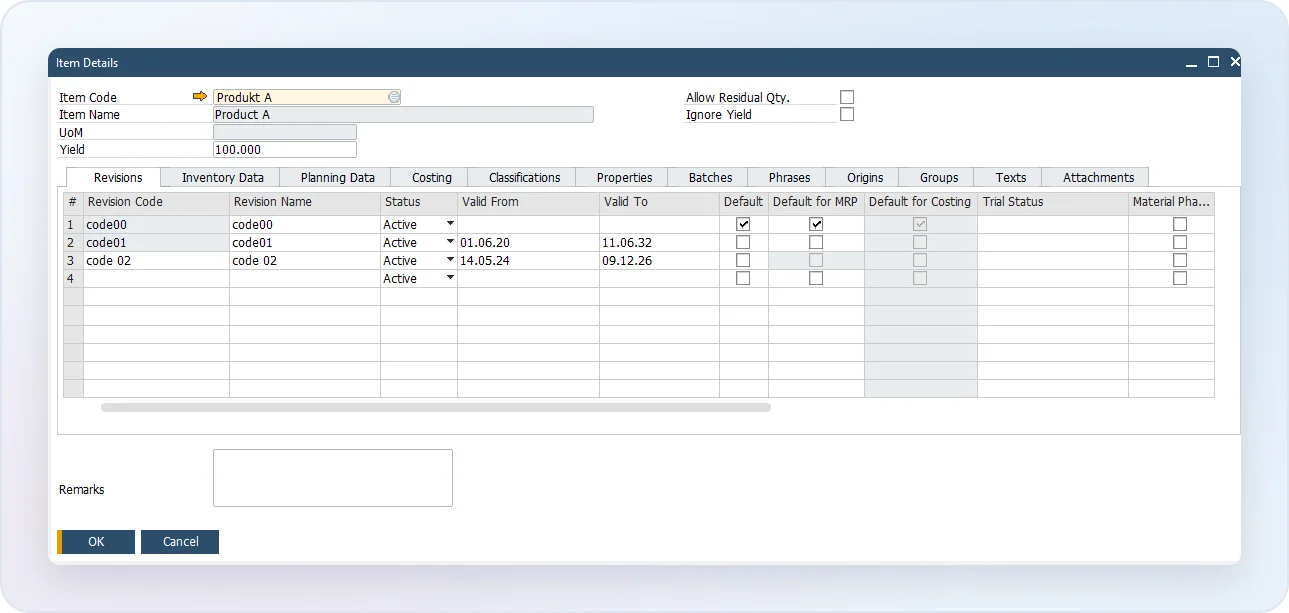
In CompuTec ProcessForce, each version of an item’s design is a Revision, with its own Bill of Materials. A Revision can carry valid-from and valid-to dates, so a new design takes effect on the day you decide, and the old one can end when it starts.
One Revision is marked as the default, and it fills in automatically on new documents. The Revision is recorded on the Sales Order and carried into the Manufacturing Order created from it, so each order shows the design it was built to.
Letting an Old Revision Run Out
A design rarely changes overnight. There are orders in progress, stock of old components and customers who ordered the previous version.
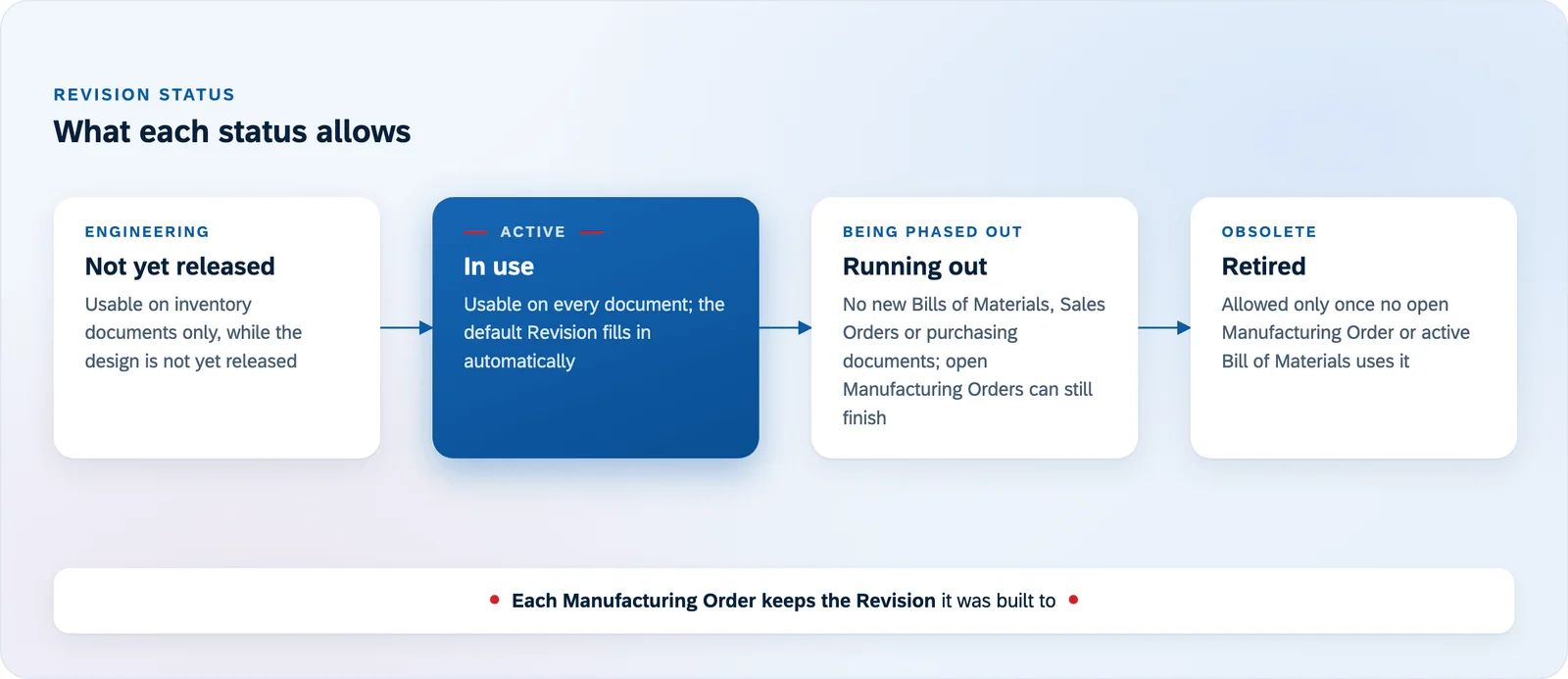
Each Revision has a status that controls what it can still be used for. A Revision that is being phased out can no longer be used on new Bills of Materials, Sales Orders or purchasing documents, while existing orders finish on it. A Revision still in engineering can only be used on inventory documents, so it can’t be sold or bought before it is ready. And a Revision can only be made obsolete once no open Manufacturing Order or active Bill of Materials uses it, so nothing in progress is left on a design that no longer exists.
Changing Many Bills of Materials at Once
A new component often affects many products at the same time: a different motor across a range of pumps, or a replacement fastener used in dozens of assemblies. Editing each Bill of Materials by hand is slow, and it is easy to miss one.
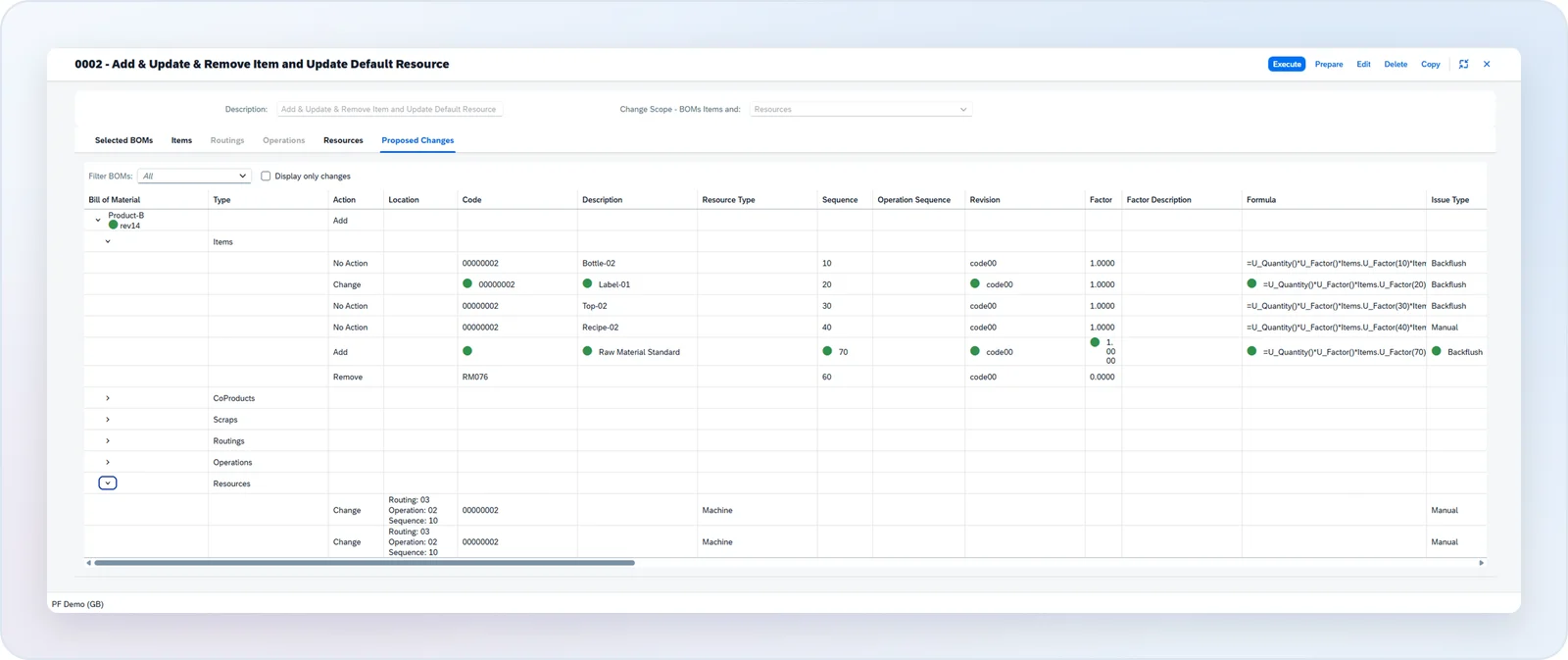
Mass BOM Update in CompuTec ProcessForce prepares the change as a scenario. You select the Bills of Materials, define what is added, changed or removed (components, co-products, scrap, routings, operations and resources), and review the proposed changes line by line before you execute them. The change can be saved as a new Revision or applied to the existing one, depending on how you manage the design. To swap one component wherever it is used, Mass Item Replacement finds the Bills of Materials that contain it and replaces it in one step.
Bringing Open Orders Up to Date
Some changes have to reach orders that already exist. CompuTec ProcessForce can push a change from the Bill of Materials into Manufacturing Orders that have not started yet, whether they are not scheduled, scheduled or released, and apply all the updates in one transaction. Orders that have already started are not changed.
Building and Picking to the Right Revision
The Revision follows the order through production. When materials are picked for a Manufacturing Order, batches can be filtered by Revision, so components made to an earlier design are not issued by mistake. MRP II plans by Revision too, so purchasing buys the components the new design needs rather than the ones it replaced.
Once your engineering team has signed off on a change, the system keeps old and new designs apart from the Sales Order to the shop floor, and each order keeps the record of the Revision it was built to.
Our Industrial Manufacturing & Components page covers how CompuTec solutions support industrial manufacturers more broadly, and the Bill of Materials & Routings page describes Revisions and Mass BOM Update in full. To see engineering change control with your own products, you can request a demo.