/Solutions/ Features
Bill of Materials & Routings
Define what a product is made of and how it is made, inside SAP Business One, down to co-products, scrap, yield, and tooling.
- Formulas, Recipes & Assemblies
- Production Outputs
- Routings & Operations
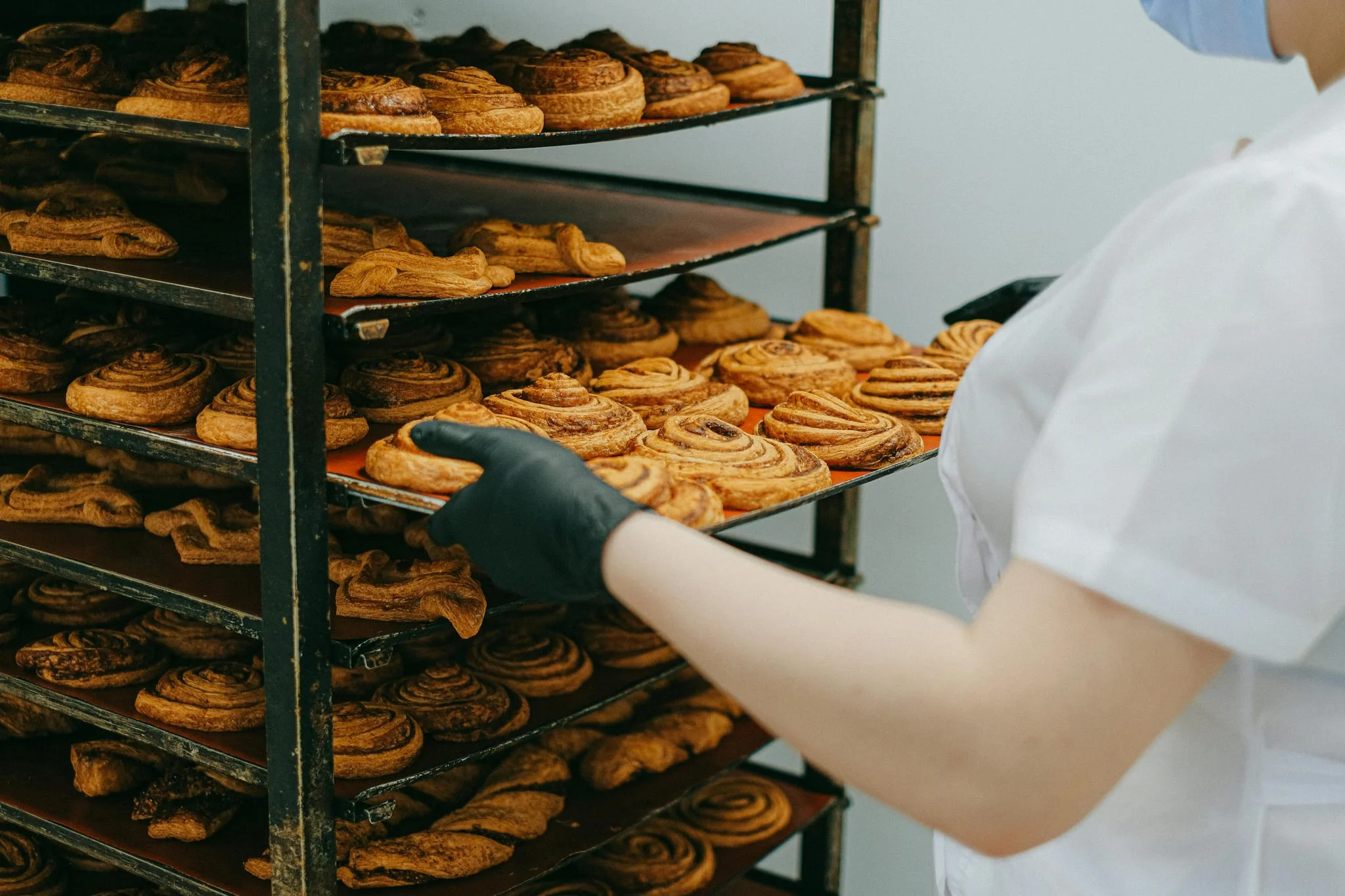
The Foundation of Every Manufacturing Order
CompuTec ProcessForce gives you a BOM that goes beyond standard SAP Business One, handling co-products, scrap, yield analysis, and multiple simultaneous revisions in one record. Routings define how it is made: the operation sequence, the resources and tooling each step needs, and any subcontracted work. Everything feeds directly into Manufacturing Orders, MRP calculations, and product costing, with no duplicate data entry.

The Business Impact of Well-Structured BOMs and Routings
Recipe Accuracy and Flexibility
- Complete Product Definition: Multi-level BOMs with sub-assemblies, semi-finished, and phantom items give full visibility into how products are made.
- Full Production Scope: WIP items and planned yield are captured in the same BOM record as the components themselves.
- Built-in Flexibility: Multiple BOM revisions can be active simultaneously, adapting to changing materials, costs, or customer needs.
One System for Recipes and Assemblies
- Quantity-Based, for Assembled Products: An electronics assembly lists exact counts — one circuit board, twelve capacitors, four screws — and requirements rise in whole units with every unit built.
- Percentage-Based, for Recipes and Formulations: An ice cream mix is defined by share of the batch, so cream, sugar, and stabilizer hold their ratio whether the run is 200 or 2,000 liters.
- One Record, Any Batch Size: Whichever way quantities are entered, they are recalculated for the batch size on each Manufacturing Order, so the same BOM serves a trial run and a full production run.
Value Recovered from Every Output
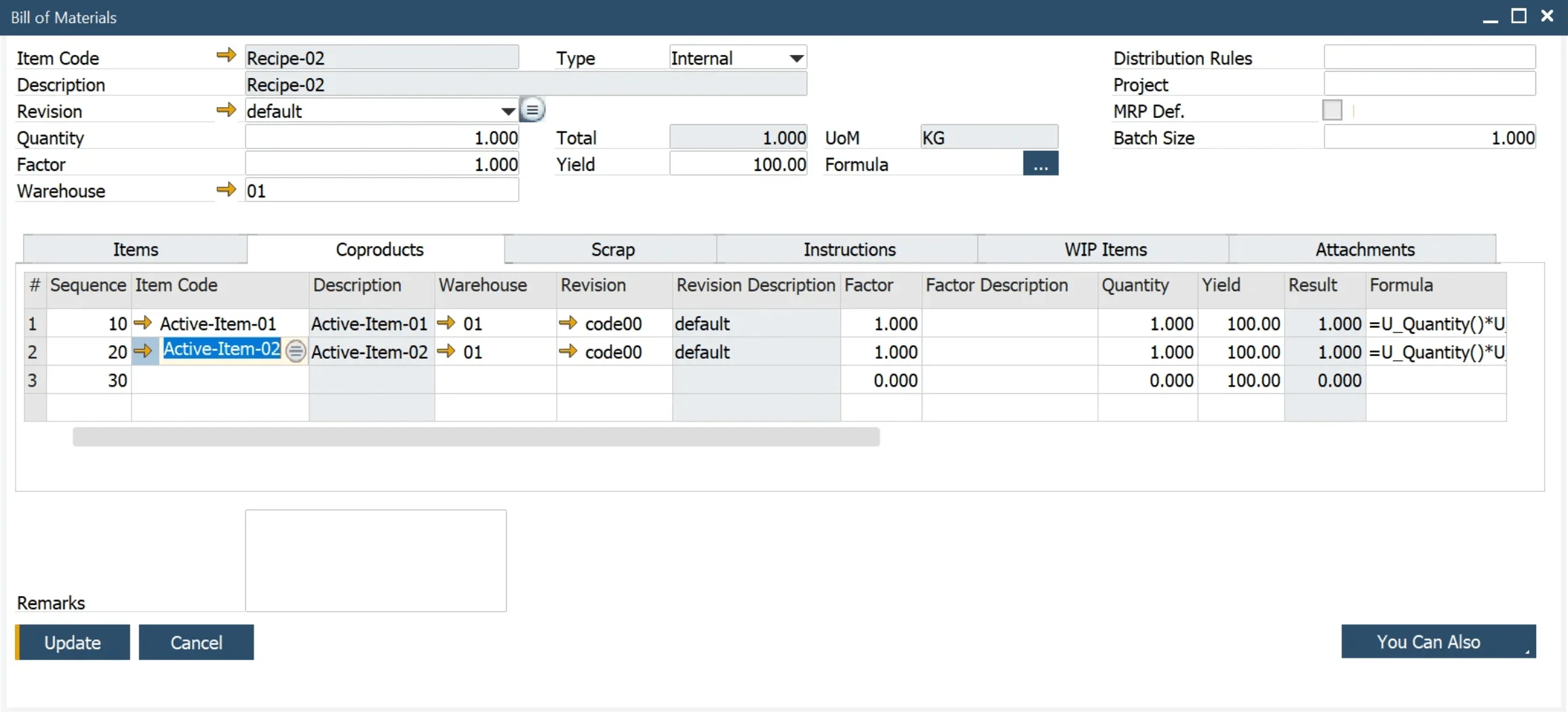
- Co-Products: Planned secondary outputs are received into stock with their own cost, so a second saleable product earns its own revenue instead of disappearing into the main product's margin.
- By-Products and Scrap: Both are recorded against the production run and separated by type, so recoverable material can be sold or reused while genuine loss is measured rather than estimated.
- Rework: A rework item can be defined as both a co-product and a raw material, keeping stock awaiting reprocessing clearly separate from finished goods ready to ship.
Consistent Production Routing
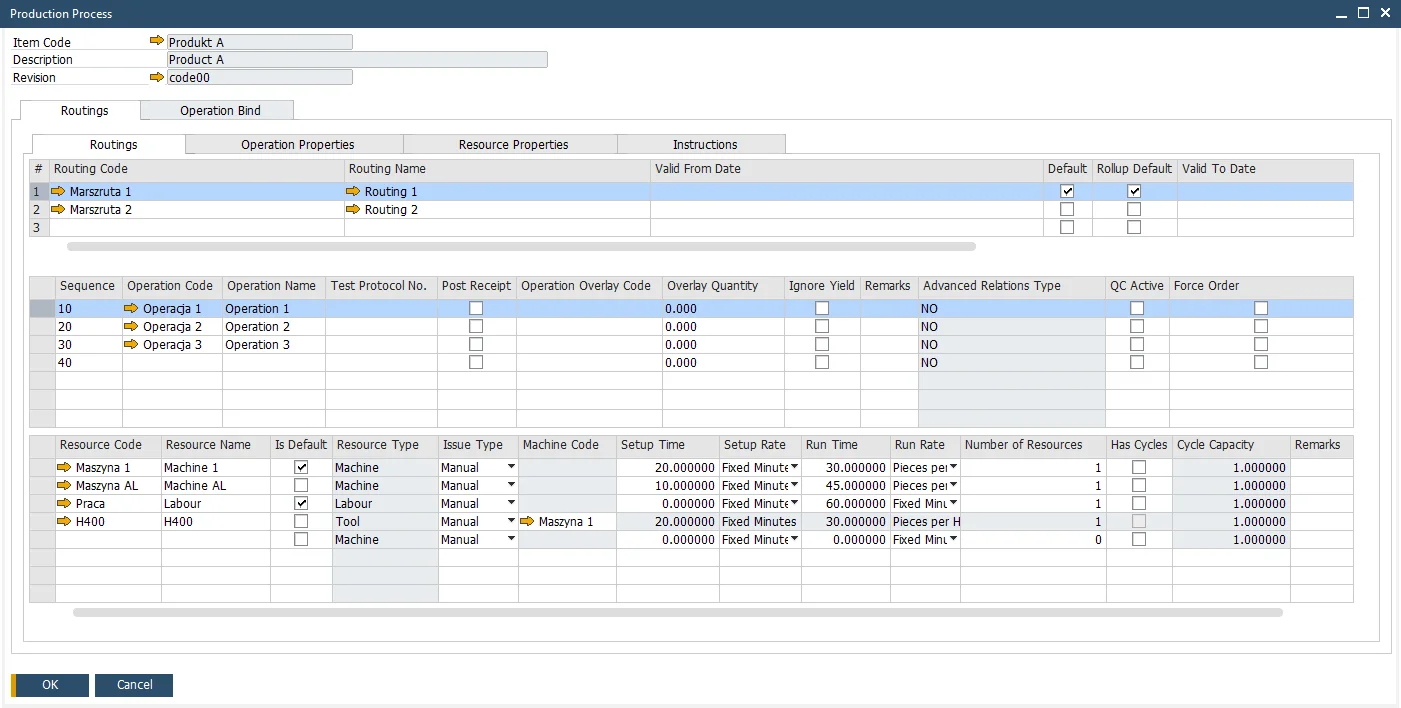
- Multiple Routings: Define several production paths for the same item and select the most suitable one per order.
- Parallel Operations: Operations can overlap, with resource times configurable per routing and operation.
- Documented Best Practice: Production guidelines and work instructions are stored at operation level for easy reference.
Yield Control and Waste Reduction
- Planned Yield Built In: Planned yield percentages increase material quantities automatically, so an order asks for what the process really consumes rather than the theoretical minimum.
- Scrap Factors per Component: An expected loss percentage on a component line raises that line's quantity, so a material that reliably wastes a few percent is planned for instead of causing shortages.
- Planned vs. Actual Yield: Actual yield is calculated against the planned standard, giving manufacturers the data to identify and reduce material waste over time.
Change Without Manual Re-Entry
- Efficiency at Scale: Replace a component or routing across hundreds of BOMs in one operation, saving hours spent on manual updates.
- Consistent Standards: When production standards change, updates can be rolled out across all affected BOMs simultaneously, keeping every recipe aligned.
- Controlled Rollout: Updated BOMs can be saved as new Revisions, preserving existing records while changes are introduced in a structured way.
Explore Our BOM and Routing Capabilities
BOM Structure & Revisions
Define your product structure in full, with support for multi-level BOMs and multiple active revisions.
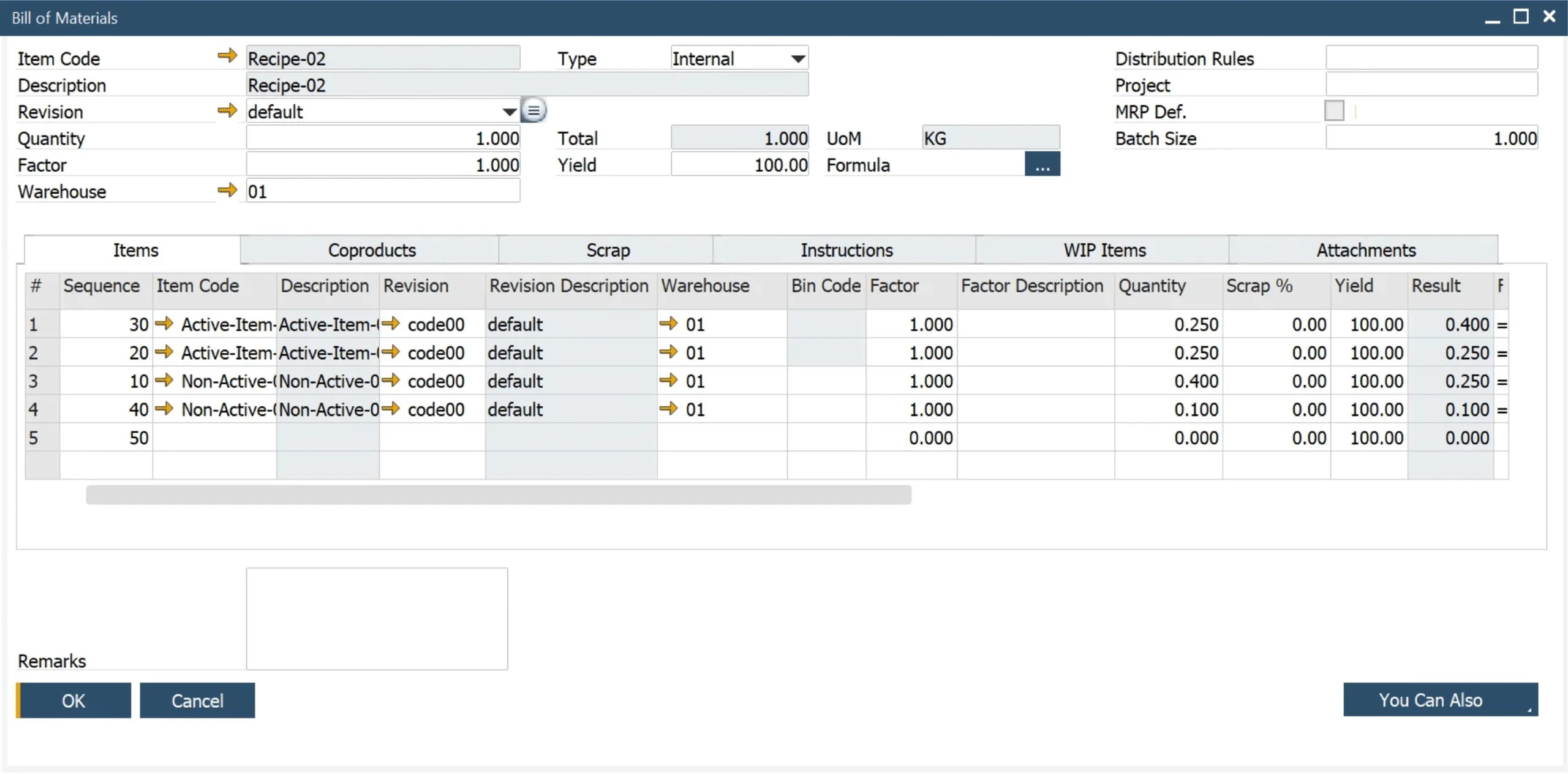
CompuTec ProcessForce | Bill of Materials
Multi-Level BOMs
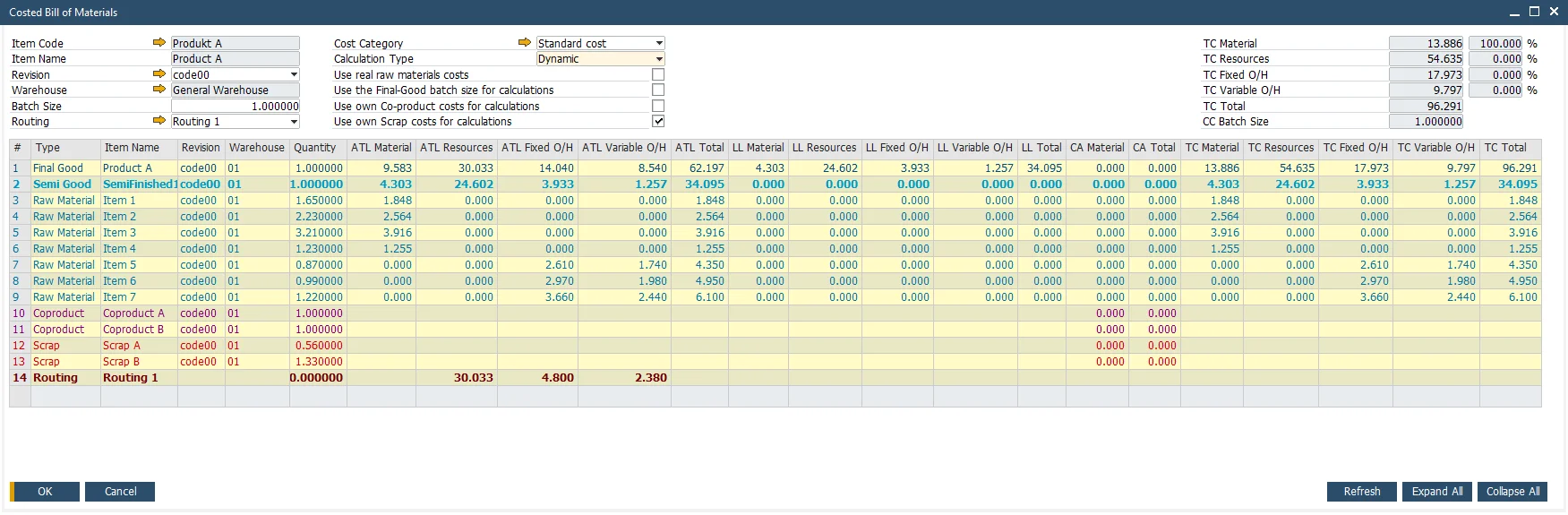
BOMs can be nested across multiple levels, with each level carrying its own items, co-products, scrap, and yield values, giving a complete picture of how each product is made.
Phantom Items
An intermediate product that never enters stock, because it moves straight into the next stage of production. Its components and operations expand into the parent Manufacturing Order.
BOM Revisions
Multiple active revisions can be defined for the same item, each a complete and independent formulation, covering different material sources, customer-specific recipes, or seasonal variations.
- Documentation Center (opens in new tab)
View CompuTec ProcessForce documentation
Advantages for Your Industry
Percentage formulations, multi-level assemblies, client-specific BOMs. How you define a product depends on your industry.

Interested in learning how CompuTec ProcessForce can help your team manage BOMs and Routings?
Bills of Materials and Routings are where every Manufacturing Order, MRP run, and product cost begins. Request a demo to see how CompuTec ProcessForce handles them, or read more about the wider solution.
Frequently Asked Questions
What is a Bill of Materials in CompuTec ProcessForce?
A Bill of Materials (BOM) in CompuTec ProcessForce defines the materials and quantities required to produce a finished good, together with the co-products, by-products, scrap, and WIP items associated with the production run. It supports multi-level structures, phantom items, and multiple active revisions per item, extending the standard BOM functionality available in SAP Business One.
What does CompuTec ProcessForce add over the standard SAP Business One Bill of Materials?
The standard SAP Business One Bill of Materials lists components and quantities. CompuTec ProcessForce extends the same record to cover co-products, by-products and scrap, planned yield, formula-based quantities that scale with batch size, and multiple revisions active at once. Routings then add the operations, resources, and quality control checks, with each revision carrying its own costing record.
Does this work for discrete manufacturing as well as process manufacturing?
Yes, and the Bill of Materials adapts to each. Discrete manufacturing works from quantity-based structures, where components are entered as absolute counts per unit of the parent item. Process manufacturing works from percentage-based recipes, where each ingredient is entered as a share of the batch so ratios hold at any volume. Both are resolved through the same Formula and scale automatically to the quantity on the Manufacturing Order, so manufacturers running the two side by side work from one system. Discrete production also relies on multi-level assemblies, alternative routings, tooling and resource assignment, and subcontracted operations, all defined in the same records.
What is the difference between a BOM and a Routing in CompuTec ProcessForce?
A BOM defines what materials are needed to make a product, while a Routing defines the sequence of steps and the resources by which it is made. In CompuTec ProcessForce, the two are linked through the Production Process, which assigns one or more routings to a BOM revision and binds specific materials to specific operations.
Can I have multiple versions of the same recipe in CompuTec ProcessForce?
Yes. CompuTec ProcessForce supports BOM Revisions, which allow multiple alternative formulations to be defined for the same item. Any number of revisions can be active simultaneously, covering scenarios such as different material sources, customer-specific recipes, or seasonal variations.
What is the difference between a co-product, a by-product, and scrap in CompuTec ProcessForce?
Co-products are planned secondary outputs with commercial value, defined on their own tab in the Bill of Materials and received into stock with their own cost when the Manufacturing Order is completed. By-products and scrap are both defined on the Scrap tab and separated by type: a by-product can be sold or reused in a later production run, while scrap cannot be reused. All three create inventory transactions, and CompuTec ProcessForce calculates yield separately for the parent item, co-products, by-products, and scrap.
How does CompuTec ProcessForce handle rework?
Three ways, depending on when the problem is found. A transaction can be rolled back within the same Manufacturing Order to reverse it. A finished product can be issued back into production for repacking or for mixing with fresh raw materials. Where rework is a known and recurring requirement, it can be planned into the Bill of Materials by defining a dedicated rework item as both a co-product and a raw material, which keeps stock awaiting reprocessing clearly separate from finished goods ready for dispatch.
Does CompuTec ProcessForce support subcontracting within a routing?
Yes. Subcontractor-type resources can be defined and added to operations within a routing, integrating outsourced production steps directly into the Manufacturing Order. Each subcontractor operation is linked to a specific vendor and service item, giving full visibility of external processes.
Can I update a component across multiple BOMs at once in CompuTec ProcessForce?
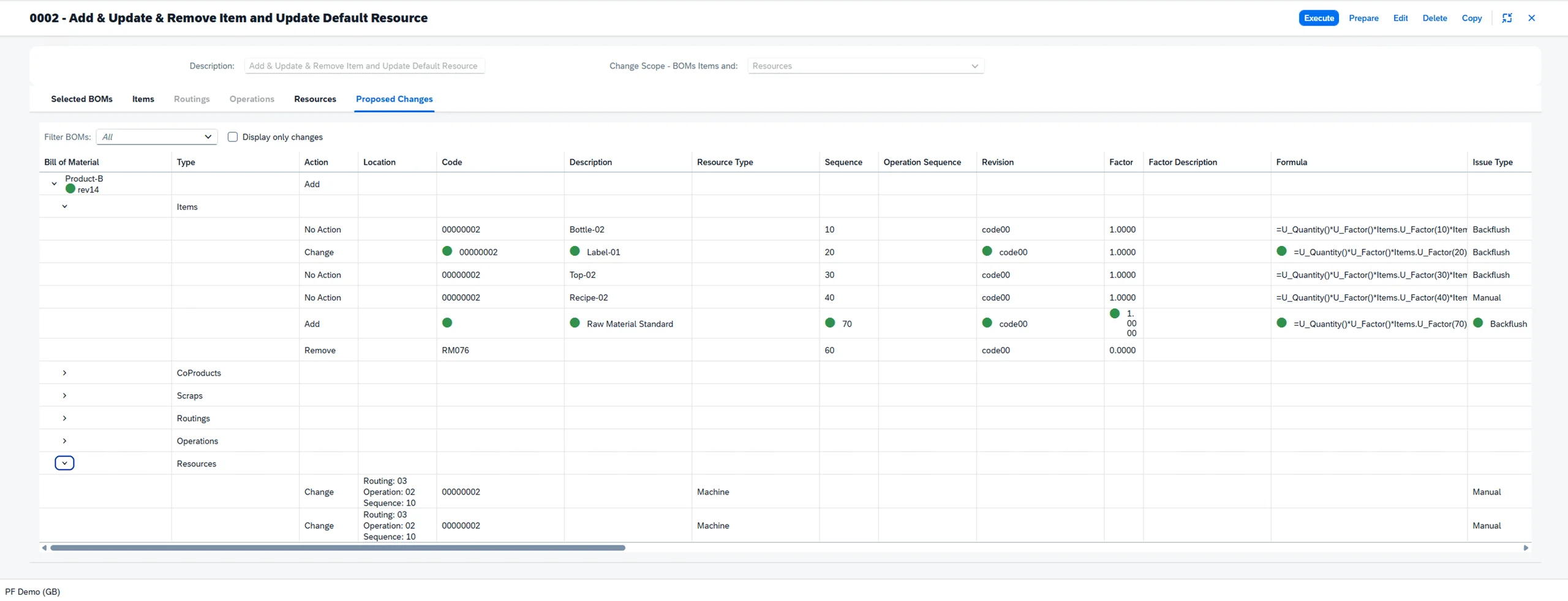
Yes. The Mass BOM Update functionality allows a component, co-product, scrap item, routing, operation, or resource to be replaced or updated across multiple BOMs in a single operation. Changes can be saved as new revisions, preserving existing records while the updates are rolled out.
Can the BOM and Routing support manual issue and backflushing?
Yes, CompuTec ProcessForce manages both the manual issuing and backflushing of quantities based on the BOM and Routing standards. Batch traced materials can also be backflushed based on FIFO principles.
Our Solutions & Services
Fully integrated, AI-ready solutions for SAP Business One, plus the implementation, hosting and support to run them.













Bill of Materials & Routings
Product & Process Definition
Product Costing
Cost Rollup & Calculation
MRP II & Scheduling
Material & Capacity Planning
Production Execution & Control
Manufacturing Order Execution
Quality Control & Complaints
Quality Tests & Non-Conformances
Traceability & Compliance
Batch Traceability & Audit Trail
Plant Maintenance
Equipment Maintenance Planning
GS1 & Logistics
GS1 Barcodes & Label Automation
Reporting & Analytics
Analytical Pages & Dashboards
Blog
From technical updates to industry trends — stay informed with the latest feature releases, expert business insights, and upcoming global events.

Events & Webinars
Join Us in Amsterdam This October
CompuTec brings news on AI and the SAP Business One Web Client to two back-to-back partner events in Amsterdam, October 19–22, 2026.

SAP Business One
CompuTec WebUp Now Covers the Latest SAP Business One 10.0 Web Client Views

CompuTec WMS
Custom Row Colors and More in CompuTec WMS 3.2608.1

Events & Webinars
The Web Client-First Era: SAP Business One Version 11, AI, and the CompuTec Roadmap

CompuTec ProcessForce
Focusing on the Next Generation