/Solutions/ CompuTec Solutions
CompuTec KSeF — SAP Business One Integration for Poland's National e-Invoicing System
KSeF compliance for SAP Business One, covering structured invoice generation, scheduled submission, incoming invoice processing, and real-time status monitoring, without a separate portal or parallel system.
- Full KSeF Compliance
- End-to-End Invoice Handling
- Inside SAP Business One

KSeF Compliance, Built Into SAP Business One
Poland's National e-Invoicing System (KSeF) requires all taxpayers to issue and receive structured invoices via a central government platform. CompuTec KSeF manages that entire process from within SAP Business One. Outgoing invoices are generated, scheduled, and submitted automatically. Incoming supplier invoices are downloaded from KSeF, reviewed in a staging buffer, and processed with business partners, document types, and account assignments proposed automatically based on incoming invoice data and your SAP Business One configuration.

What CompuTec KSeF Delivers
Compliance Built Into Your Workflow
- KSeF-Ready Invoicing: Every Sales Invoice, Down Payment Invoice, and Correction Invoice is automatically generated in the official KSeF XML format required by Polish authorities.
- Scheduled Submission: A configurable grace period between XML generation and final transmission gives your team time to review and correct documents before they become permanent legal records.
- JPK_VAT Integration: KSeF reference numbers are handled in line with Polish tax reporting requirements, including JPK_VAT.
Incoming Invoice Control
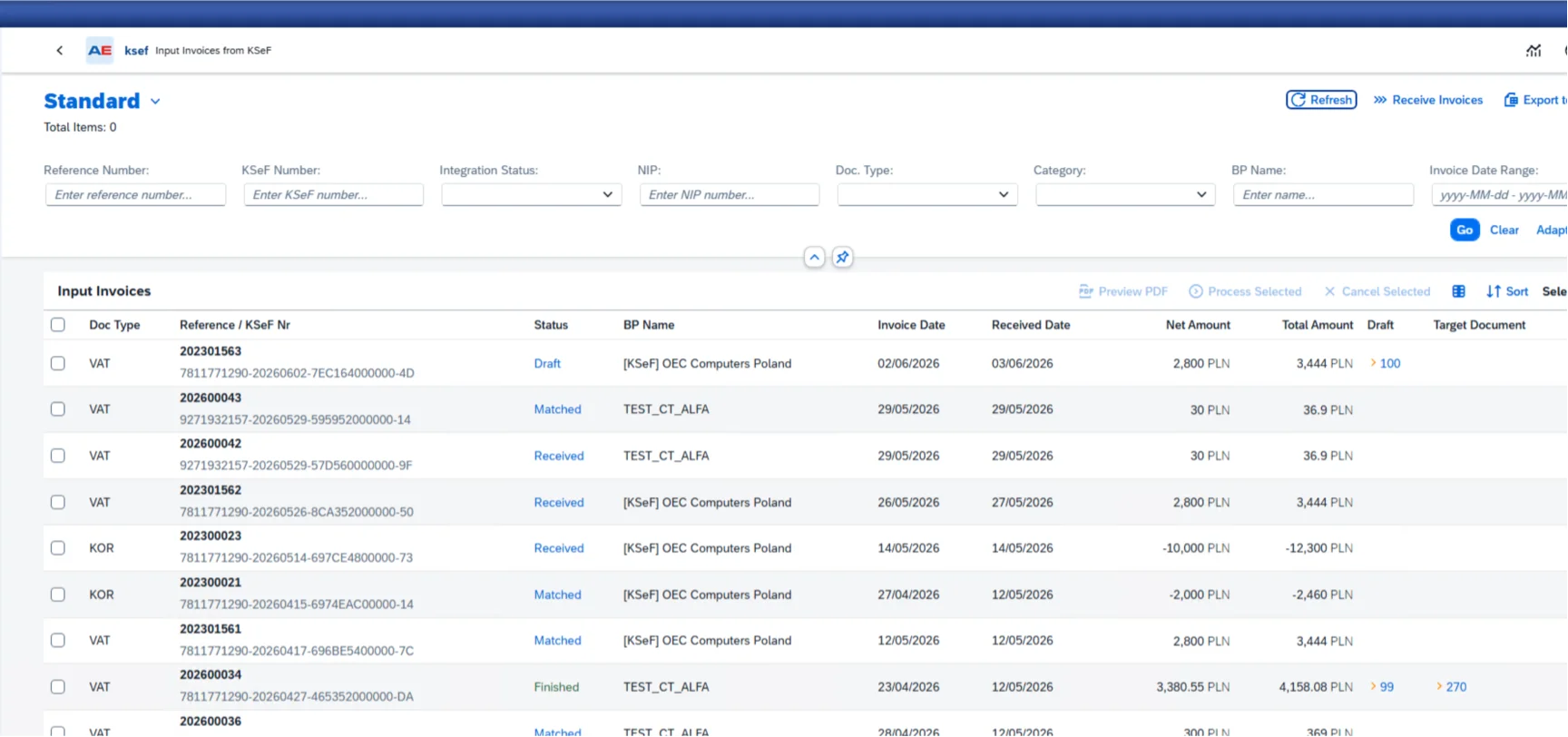
- Monitoring Buffer: Incoming invoices from KSeF land in a secure staging area before being processed into SAP Business One, giving your accounting team a verification step.
- Fraud and Error Prevention: Any invoice submitted to your KSeF buffer by an unknown party can be reviewed before it enters your books, reducing the risk of fraudulent or incorrect entries.
- Payment Integration: KSeF reference numbers can be included in outgoing payment transfer files, with each payment method configured individually to support this.
Incoming Invoice Processing
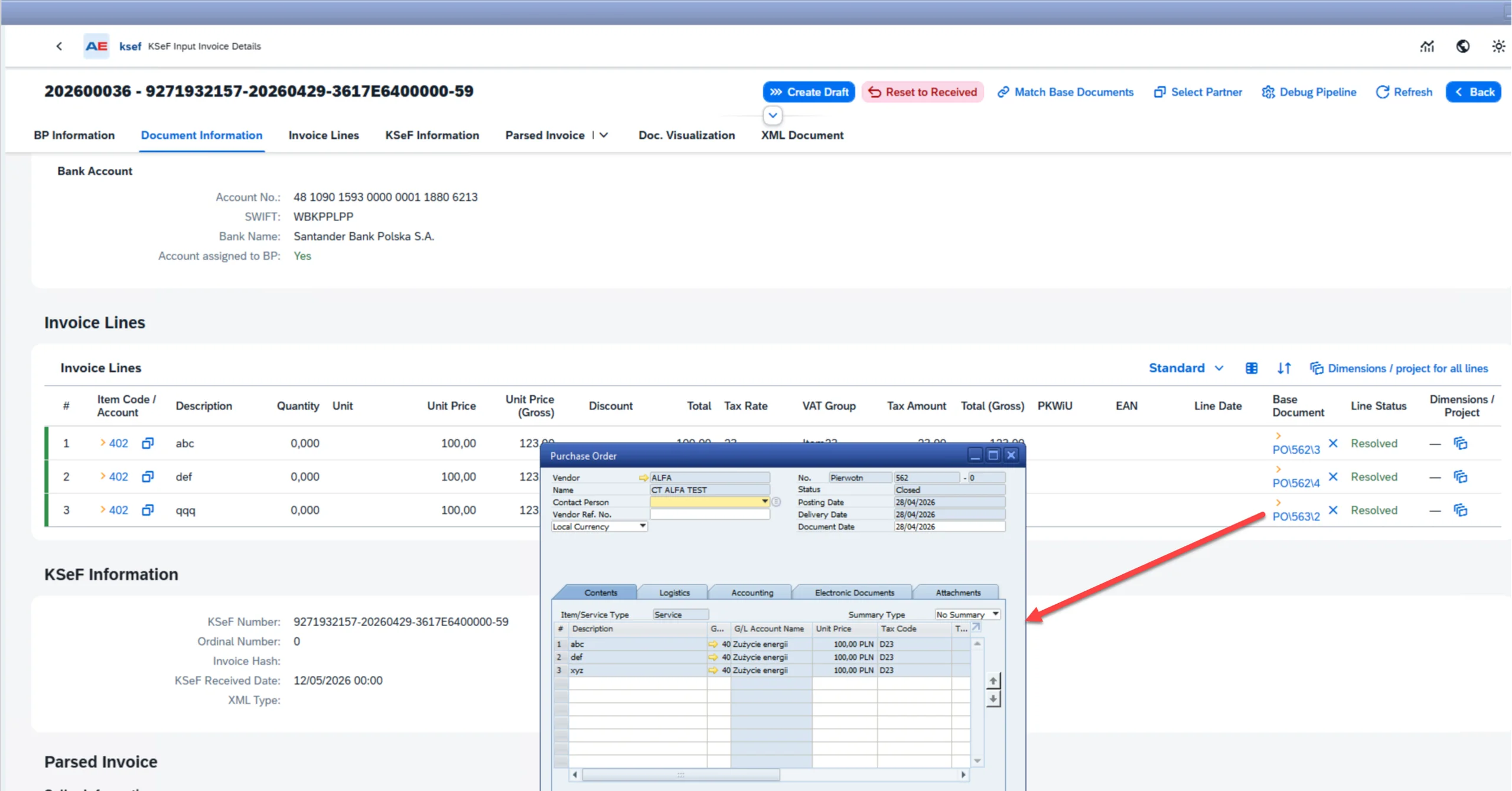
- Automatic Matching: Business partners, document types, item codes, accounts, cost centers, projects, and base documents are proposed automatically based on incoming KSeF invoice data and your SAP Business One configuration.
- Manual Override: Any automatically proposed field can be changed or selected manually using choose-from-list functionality, with drag-and-drop support for base documents.
- Draft Document Creation: SAP Business One draft documents are created automatically from incoming KSeF invoices, ready for review and posting by your accounting team.
- Single and Batch Processing: Incoming documents can be processed individually or in bulk, giving your team flexibility to handle high volumes efficiently.
Operational Reliability
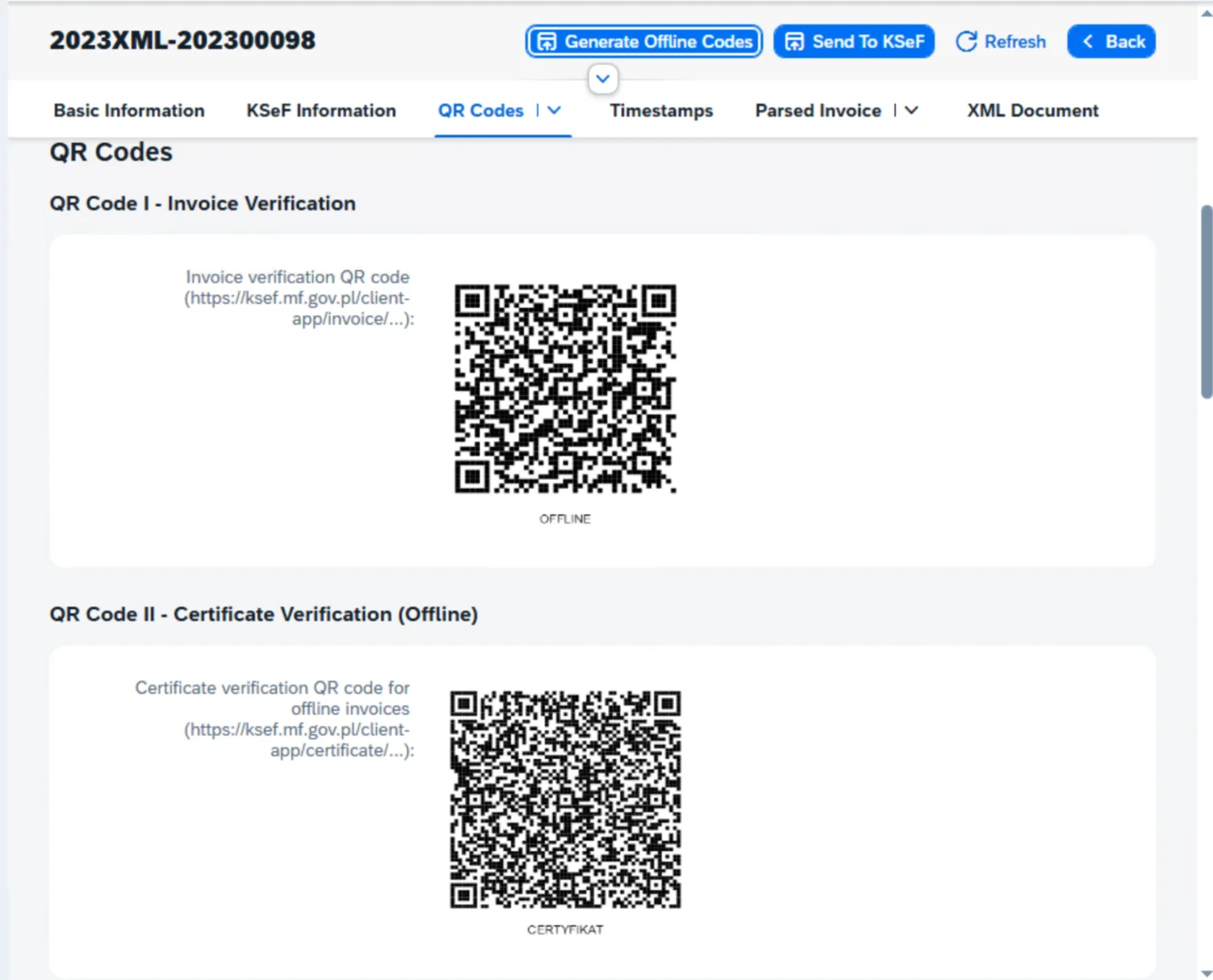
- Offline Mode: If the KSeF government platform is unavailable, the system uses your configured offline certificate to generate temporary offline QR codes, allowing invoices to be issued in compliance with Polish regulations.
- Backward Compatibility: CompuTec KSeF works with SAP Business One 10 FP 2408 and later, on both Microsoft SQL Server and SAP HANA, meaning compliance does not require an SAP Business One upgrade.
Real-Time Visibility
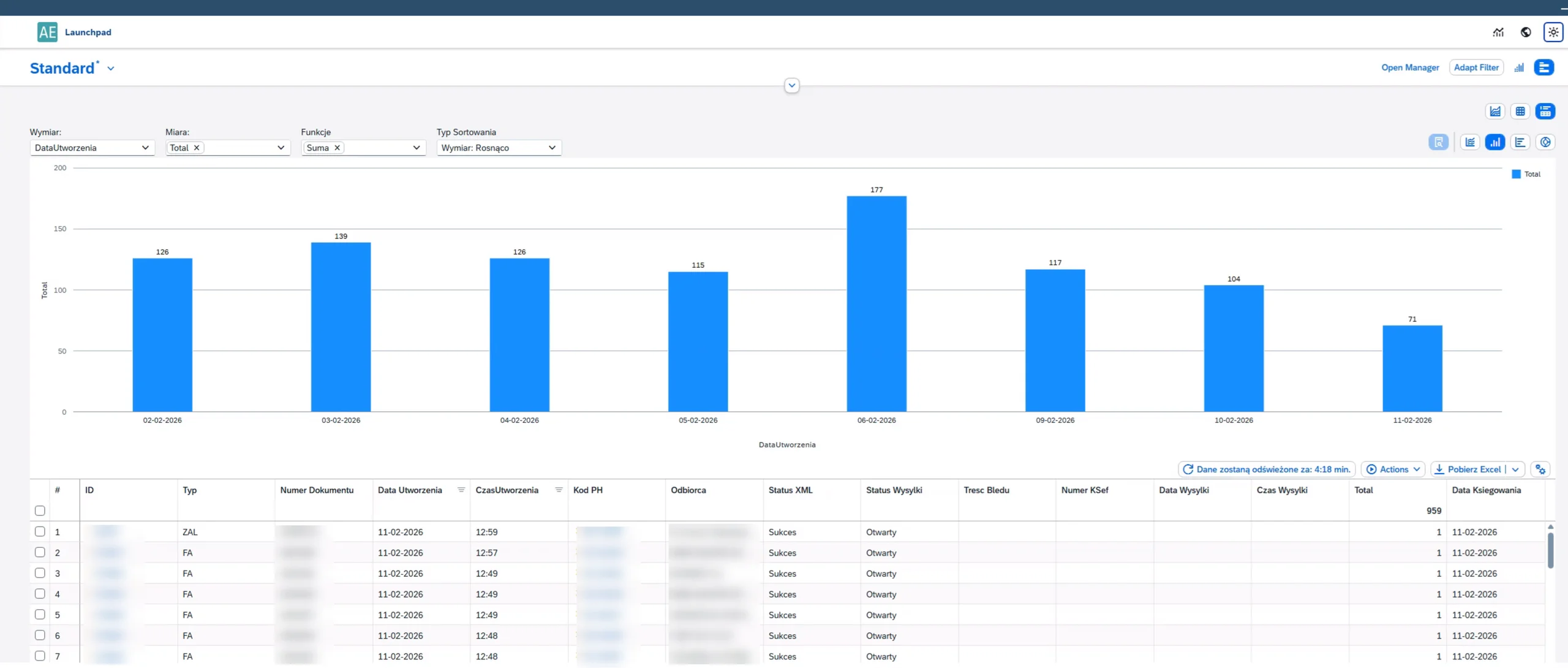
- Submission Status Tracking: Submission status for every outgoing invoice is visible directly in SAP Business One, showing accepted, rejected, or pending results from the government platform.
- Incoming Document Status: Every incoming document has a clearly visible status (new, under processing, or finished), giving your accounting team an immediate overview of what requires attention.
- Document Filtering and Drill-Down: Incoming invoices can be filtered by supplier, document type, number, and other properties, with drill-down access to linked SAP Business One objects and relevant master data.
Integration with CompuTec Solutions
- Manufacturing and Warehouse: Invoices triggered from production and warehouse workflows in CompuTec ProcessForce and CompuTec WMS are handled by CompuTec KSeF, extending compliance across your operation.
- Customizable Data Mapping: SQL-based field mapping can be configured to determine which data fields are included in the XML output, accommodating both Polish legal requirements and internal corporate data standards.
- Native SAP Business One Integration: Everything runs inside your existing SAP Business One environment with no separate portal or parallel system, minimizing the need for additional user training.
Features
Structured Invoice Handling
Generate, process, and store invoices in the official KSeF XML schema defined by Polish authorities, covering Sales Invoices, Down Payment Invoices, and Correction Invoices.
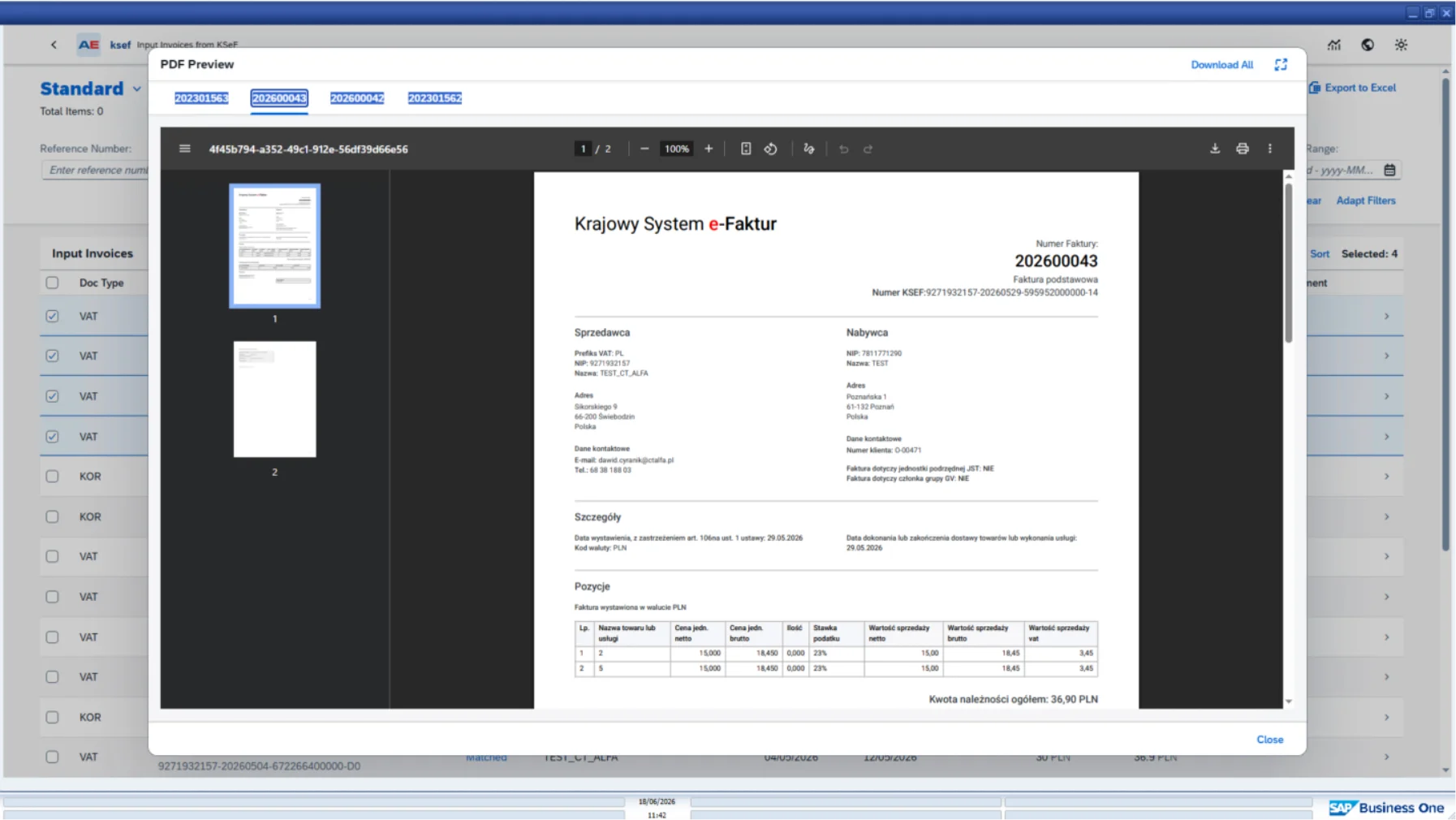
CompuTec KSeF | Ministry of Finance Layout Visualization
Automatic XML Generation
Every qualifying document added in SAP Business One triggers immediate generation of the required KSeF XML file.
Scheduled Submission
Configure a grace period between XML generation and final transmission to the government platform, giving your team time to review or cancel documents before they are permanently submitted.
Customizable Data Mapping
Use SQL-based field mapping to control which data fields are included in the XML output, accommodating both legal requirements and internal corporate data standards.
Ministry of Finance Layout Visualization
View invoices in the official Ministry of Finance layout before and after submission. After submission, the layout is enriched with the KSeF number and QR code. Documents can be saved as PDF and sent to customers directly from SAP Business One.
- View documentation (opens in new tab)
View CompuTec KSeF documentation

Looking to handle KSeF compliance inside SAP Business One?
Poland's e-invoicing mandate applies to every business, and CompuTec KSeF manages the whole process inside SAP Business One. Whether you are issuing structured invoices, processing incoming documents, or moving KSeF handling into your existing setup, our team can show you how CompuTec KSeF could work for your business.
Frequently Asked Questions
What is KSeF and who does it apply to?
KSeF (Krajowy System e-Faktur) is Poland's National e-Invoicing System, which requires all Polish taxpayers to issue and receive invoices in a structured XML format via a central government platform. The obligation has applied to large enterprises since February 2026 and to all other taxpayers since April 2026.
What happens if I submit an incorrect invoice to KSeF?
Once an invoice is successfully submitted to the KSeF platform, it cannot be edited or deleted. Any corrections require a formal corrective document. CompuTec KSeF addresses this through scheduled submission, which creates a configurable window between XML generation and final transmission, giving your team time to review and cancel documents before they are permanently recorded.
Does CompuTec KSeF require the latest version of SAP Business One?
No. CompuTec KSeF is compatible with SAP Business One 10 FP 2408 and later, on both Microsoft SQL Server and SAP HANA. You do not need to upgrade SAP Business One to achieve KSeF compliance.
How does the incoming invoice buffer work?
Invoices received via KSeF from suppliers are held in a monitoring buffer before being processed into SAP Business One. Your accounting team can review and verify each invoice before it enters your records, providing a check against incorrect or unexpected submissions.
How are incoming invoices processed into SAP Business One?
Once an incoming invoice has been reviewed in the monitoring buffer, CompuTec KSeF can propose the relevant business partner, document type, item codes, accounts, cost centers, projects, and base documents such as Purchase Orders and Goods Receipt POs automatically, based on the incoming KSeF invoice data and your SAP Business One configuration. An SAP Business One draft document is then created automatically, ready for review and posting. Any automatically proposed field can also be changed or selected manually using choose-from-list functionality, with drag-and-drop support for base documents. Documents can be processed individually or in bulk.
Can I view incoming invoices in the Ministry of Finance layout?
Yes. Incoming and outgoing invoices can be viewed in the official Ministry of Finance layout directly from SAP Business One. After submission, the layout is enriched with the KSeF number and QR code. Documents can be saved as PDF and sent to customers directly from SAP Business One if required.
What happens if the KSeF government platform is unavailable?
CompuTec KSeF includes an offline mode. If the government platform is down, the system uses your configured offline certificate to generate temporary offline QR codes, allowing invoices to be issued in compliance with Polish regulations in the meantime. Synchronization with the platform resumes automatically once it is restored.
Does CompuTec KSeF work with CompuTec ProcessForce and CompuTec WMS?
Yes. Invoices triggered from production and warehouse workflows in CompuTec ProcessForce and CompuTec WMS are handled by CompuTec KSeF, so compliance extends across manufacturing and logistics operations, not just the finance department.
Can the XML invoice data be customized?
Yes. SQL-based field mapping can be configured to determine which data fields are included in the KSeF XML output. This makes it possible to meet both Polish legal requirements and any internal corporate data standards at the same time. Matching behavior for incoming invoices can also be configured to suit your specific business requirements.
Is CompuTec KSeF related to CompuTec Premium?
They are separate products. CompuTec Premium covers a broader range of Polish fiscal compliance requirements within SAP Business One, including White List verification, NIP and VIES checks, and administrative tools. CompuTec KSeF is specifically focused on structured e-invoicing via the KSeF platform. The two solutions can be used independently or together.
Our Solutions & Services
Fully integrated, AI-ready solutions for SAP Business One, plus the implementation, hosting and support to run them.













Blog
From technical updates to industry trends — stay informed with the latest feature releases, expert business insights, and upcoming global events.

Events & Webinars
Join Us in Amsterdam This October
CompuTec brings news on AI and the SAP Business One Web Client to two back-to-back partner events in Amsterdam, October 19–22, 2026.

SAP Business One
CompuTec WebUp Now Covers the Latest SAP Business One 10.0 Web Client Views

CompuTec WMS
Custom Row Colors and More in CompuTec WMS 3.2608.1

Events & Webinars
The Web Client-First Era: SAP Business One Version 11, AI, and the CompuTec Roadmap

CompuTec ProcessForce
Focusing on the Next Generation