/Solutions/ SAP Solutions
SAP Business One Integration Framework (B1if)
The built-in integration framework for SAP Business One. Connect your ERP to e-commerce platforms, EDI partners, third-party services, and your wider technology landscape, without the need for additional middleware.
- Built-In Integration Platform
- Visual Scenario Design
- EDI & E-Commerce Ready

Connect SAP Business One to Your Technology Landscape
SAP Business One Integration Framework (B1if) lets you design integration scenarios visually, then route and monitor data between SAP Business One and external systems from a single browser-based console. Pre-built scenarios cover common requirements out of the box, so many connections go live without extensive custom development.

Connecting SAP Business One to Your Business
Built Together with SAP Business One
- No Separate Middleware: The integration framework is part of SAP Business One, so there is no separate middleware platform to deploy and run alongside your ERP.
- Direct Business Object Access: Integrations read and write SAP Business One data through the DI API, Service Layer, and SQL, without a third-party connector in between.
- Browser-Based Administration: Scenarios are designed, deployed, and monitored from a dedicated browser-based console.
- Release Independence: Integration scenarios continue to work across SAP Business One upgrades without needing to be reconfigured entirely.
Connect to a Wide Range of Systems
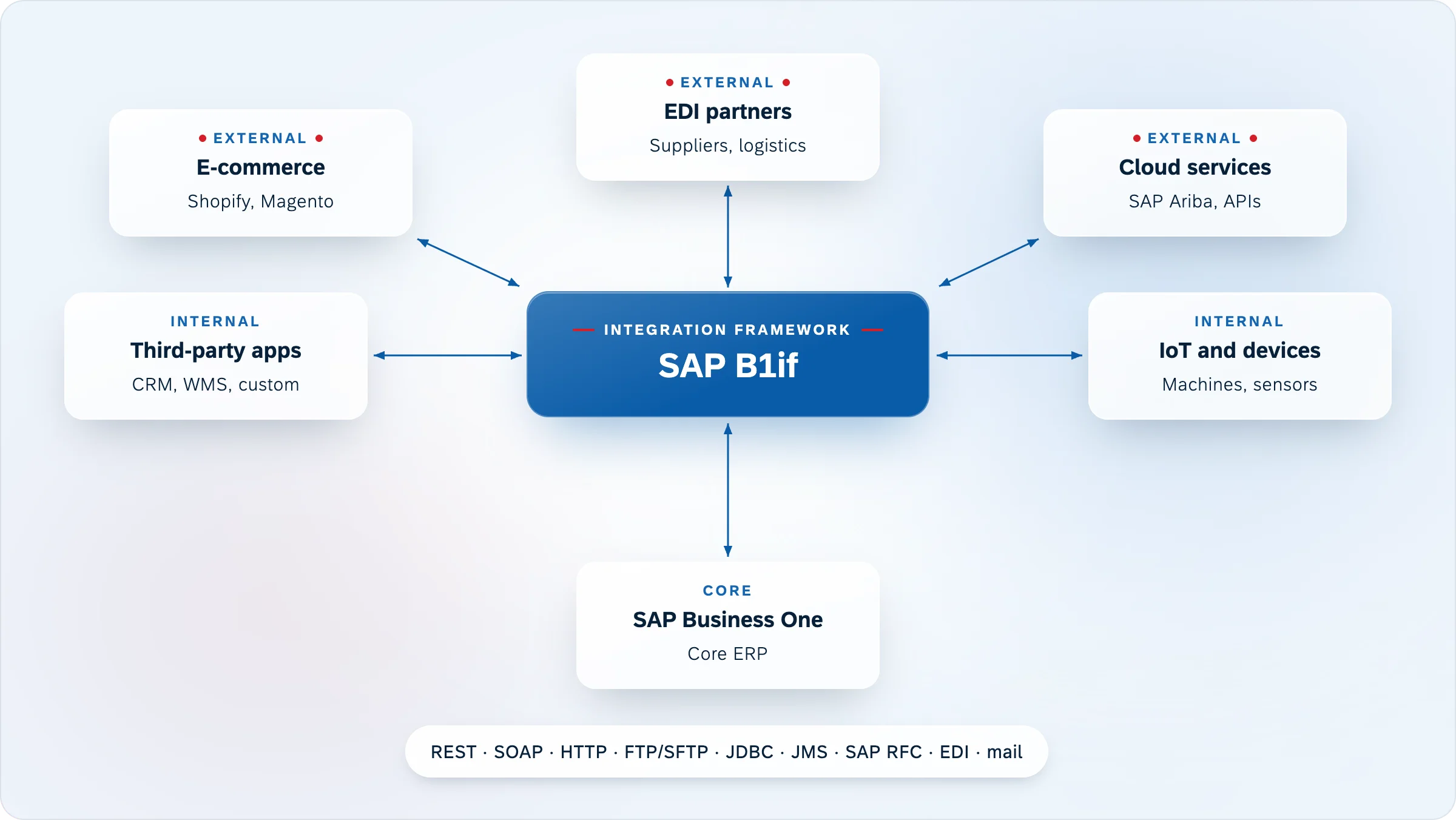
- SAP and Third-Party Connectivity: B1if connects SAP Business One to other SAP products, third-party applications, e-commerce platforms, marketplaces, EDI partners, and external services.
- Standard Transport Protocols: REST, SOAP, HTTP, FTP/SFTP, file, JDBC, and email transports are all supported, covering the connection methods most systems use.
- Multi-Step Orchestration: Data can be routed across several endpoints in a single scenario, handling more complex integration flows without separate tools.
Visual Scenario Design
- Graphical Flow Builder: Integration flows are built visually using the BizFlow designer combining triggers, processing steps, data transformations, and adapters into a complete scenario.
- Reusable Components: Existing scenarios and transformation steps can be adapted and reused, reducing the effort needed to build similar integrations.
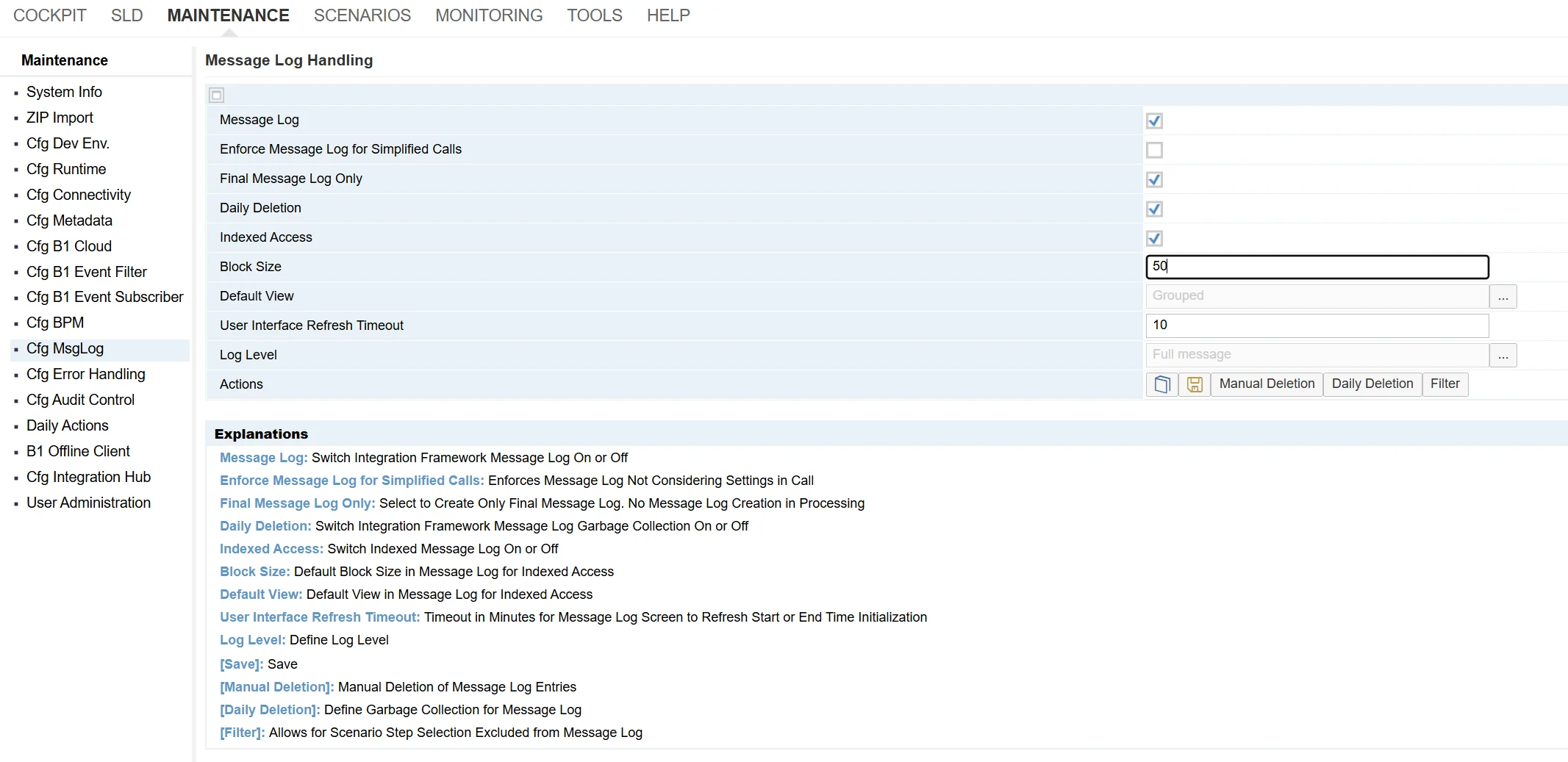
- Built-In Monitoring: Every data exchange is logged and auditable, with a message monitor and error inbox giving full visibility into what has been processed and what needs attention.
Intercompany and Multi-Entity Operations
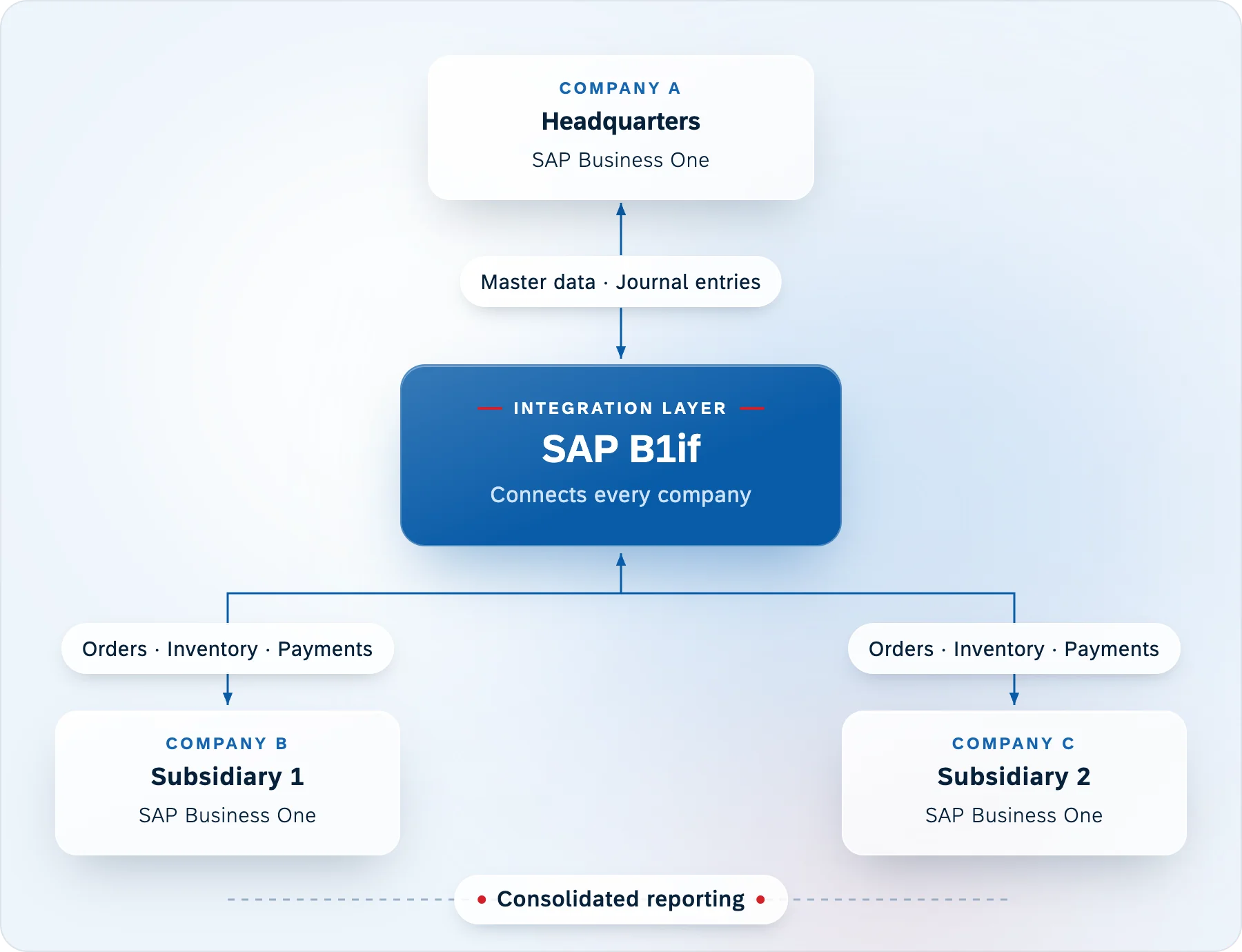
- Master Data Replication: Item and business partner records are synchronized automatically across connected SAP Business One company databases.
- Transaction Synchronization: Sales Orders, Purchase Orders, and journal entries flow between company entities without manual re-entry.
- Cross-Company Reporting: Consolidated reports and intercompany workflows are available across all connected SAP Business One systems.
Features
Visual Scenario Design
Build, test, and deploy integration flows using a graphical scenario package format, all within the browser-based B1if environment, without a separate middleware platform.
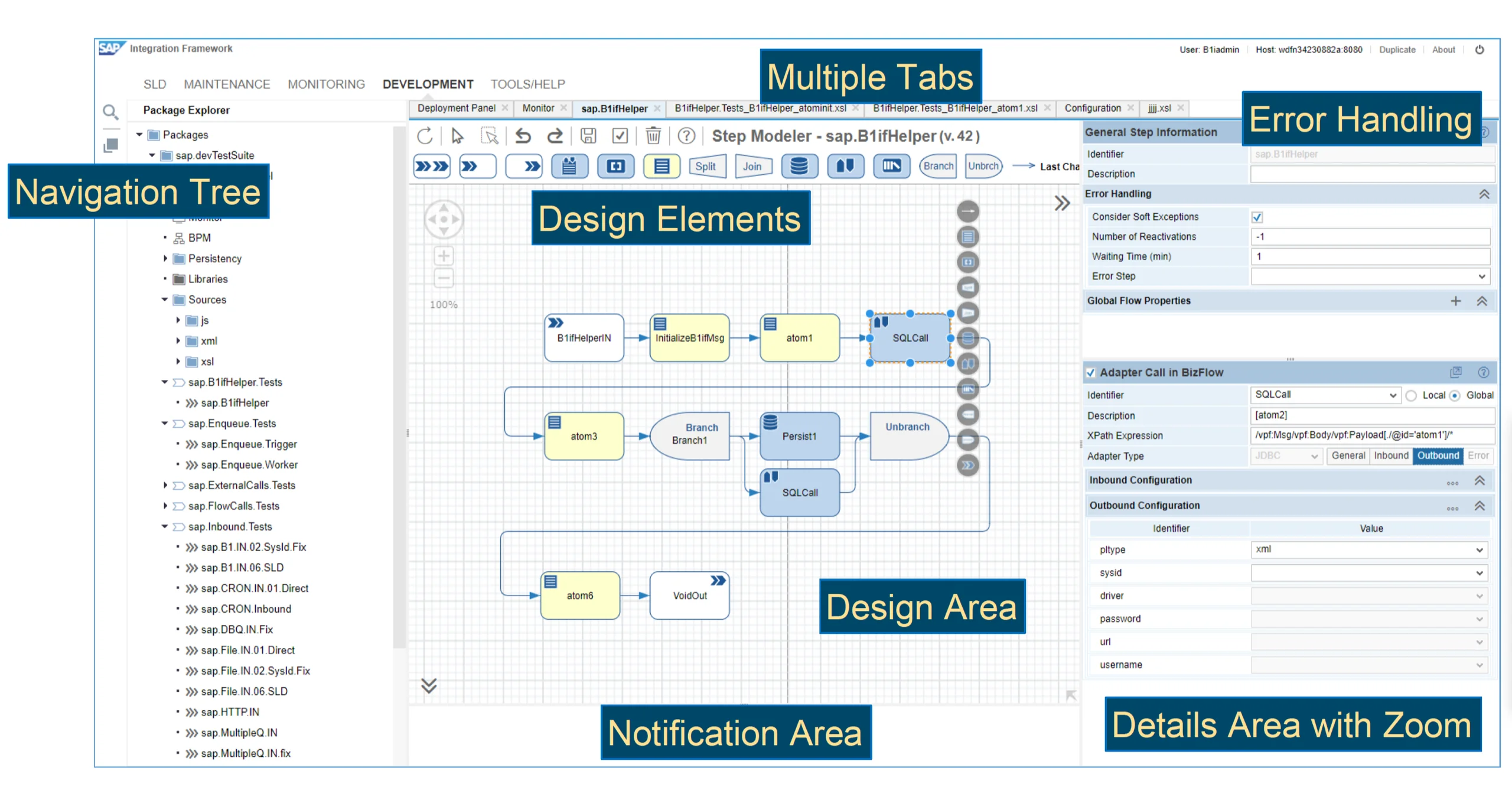
SAP Business One Integration Framework | Scenario Design
Graphical Scenario Builder
Assemble integration steps in a visual editor that maps directly to the underlying scenario XML, so every change is reviewable and version-controlled.
Reusable Transformation Library
Apply XSLT and built-in functions to translate between SAP Business One message formats and external partner schemas, then reuse the same templates across scenarios.
Inline Test Runs
Replay sample payloads and inspect intermediate results at every step to validate logic before going live.
Version and Promotion Across Environments
Export scenario packages from sandbox to staging to production, keeping each environment consistent and reducing the risk of configuration drift.
- View brochure (PDF, opens in new tab)
View the SAP Business One Integration Framework brochure
- View documentation (opens in new tab)
View SAP Business One Integration Framework documentation

Want to connect SAP Business One to the other systems your business depends on?
SAP Business One Integration Framework (B1if) connects your ERP to e-commerce platforms, EDI partners, and third-party services. Get in touch to discuss your integration requirements.
Frequently Asked Questions
What is the SAP Business One Integration Framework?
The SAP Business One Integration Framework (B1if) is a browser-based integration platform for SAP Business One. It connects SAP Business One to other SAP products, third-party applications, e-commerce platforms, web services, and external devices using standard integration protocols and a graphical scenario development environment.
Does B1if require a separate license?
Licensing for the integration framework depends on your SAP Business One configuration and the integration scenarios you need to run. CompuTec can review your requirements and confirm exactly what is needed for your setup.
What is an integration scenario?
A scenario is the core building block of B1if. It defines how data flows between SAP Business One and a connected system, including what triggers the integration, how data is mapped and transformed, and where it is sent. Pre-built scenarios are available for common requirements, and custom scenarios can be developed for more specific needs.
Do integration scenarios survive SAP Business One upgrades?
Yes. One of the practical advantages of B1if is that integration scenarios are release-independent. When SAP Business One is upgraded, existing scenarios continue to work without needing to be rebuilt. New fields introduced in a new release can be incorporated into existing scenarios when needed.
What systems can B1if connect to?
B1if connects SAP Business One to a wide range of systems, including other SAP products such as SAP S/4HANA, SAP Ariba, and SAP Customer Checkout, as well as third-party applications, e-commerce platforms such as Shopify and Magento, EDI partners, cloud services, and physical devices. Supported transport protocols include HTTP, REST, SOAP, FTP/SFTP, file, JDBC, JMS, mail, and SAP RFC, covering the connection methods used by most systems without custom transport code for each endpoint.
Can B1if be used for businesses with multiple SAP Business One entities?
Yes. B1if includes dedicated intercompany integration capabilities for businesses running multiple SAP Business One systems. Master data, transactions, and journal entries can be replicated automatically across entities, and cross-company reporting is available across connected systems.
How does B1if handle integration errors?
Failed messages are held in a dedicated error inbox rather than being lost. They can be reviewed, corrected, and reprocessed from within the monitoring interface. Asynchronous processing means the system queues and retries failed transactions automatically where configured to do so.
Do we need developers to use B1if?
Building custom integration scenarios requires technical knowledge, specifically familiarity with XML, XSLT, and the SAP Business One data structure. However, pre-built scenarios can be deployed and configured by administrators or consultants without development experience. Our team can handle both scenario development and ongoing maintenance as part of an implementation engagement.
Our Solutions & Services
Fully integrated, AI-ready solutions for SAP Business One, plus the implementation, hosting and support to run them.













Blog
From technical updates to industry trends — stay informed with the latest feature releases, expert business insights, and upcoming global events.

Events & Webinars
Join Us in Amsterdam This October
CompuTec brings news on AI and the SAP Business One Web Client to two back-to-back partner events in Amsterdam, October 19–22, 2026.

SAP Business One
CompuTec WebUp Now Covers the Latest SAP Business One 10.0 Web Client Views

CompuTec WMS
Custom Row Colors and More in CompuTec WMS 3.2608.1

Events & Webinars
The Web Client-First Era: SAP Business One Version 11, AI, and the CompuTec Roadmap

CompuTec ProcessForce
Focusing on the Next Generation