In the first half of 2026, EU chemical producer prices were 5.1% higher than a year earlier, while production from January to July fell by 2.0%, according to Cefic’s Chemical Trends Report for the third quarter. You are paying more for raw materials and spreading fixed costs over fewer batches, so every kilogram a batch loses to evaporation, residue in the vessel, or an off-spec drum costs more than it did a year ago.
With mixtures already on the market also due to be classified against the new CLP hazard classes by 1 May 2028, your technical team has enough on its plate. Batch costs are something you can get right with data you already record. This post shows how, in SAP Business One with CompuTec ProcessForce and CompuTec PDC.
Building Expected Losses Into the Formula
Most chemical processes lose a predictable share of material: solvent evaporates during mixing, resin coats the reactor wall, a filter holds back product. If the Bill of Materials assumes 100% yield, every Manufacturing Order starts short and someone on the shop floor makes up the difference by eye.
In CompuTec ProcessForce, you record the expected loss as a planned yield, and each Manufacturing Order then plans enough material and resource time to cover it. Because the yield is set on the Bill of Materials, your plans include the loss from the start, and a percentage-based Bill of Materials keeps the ratios right whether you make 200 kg or 2,000 kg.
Recording What the Batch Actually Produced
A planned yield is only useful if you measure each batch against it, and that means recording every output, not only the main product.
CompuTec ProcessForce records co-products, by-products, and scrap alongside the main product. Solvent recovered by distillation goes back into inventory as a by-product, ready to reuse or sell, and material that can only be disposed of is still recorded, so you can see how much waste each batch generates.
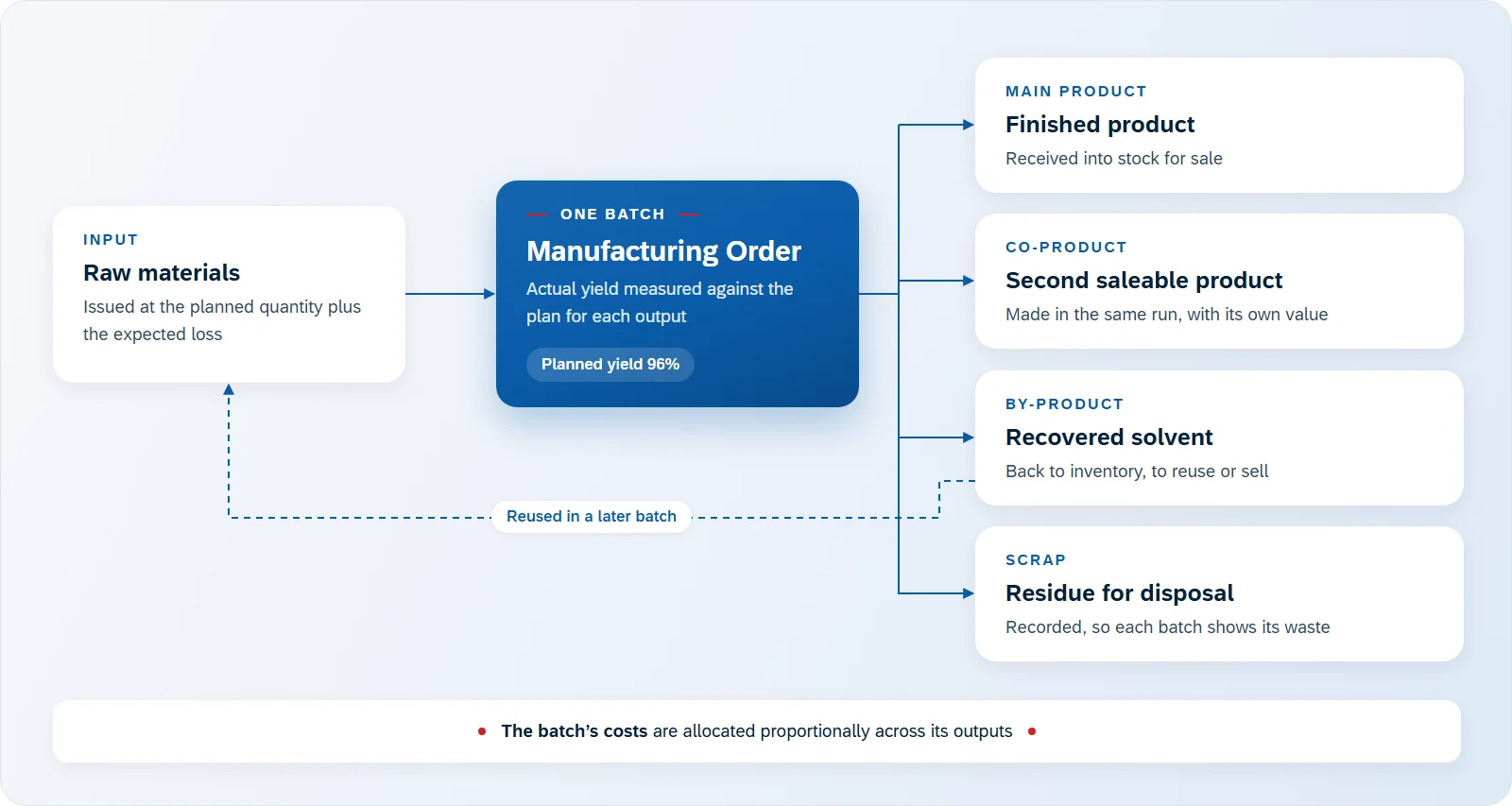
For every Manufacturing Order, the actual yield of each output is calculated from what the batch produced against what it planned. A batch that loses 7% instead of the usual 4% stands out while the cause is still easy to find.
The figures are only as good as the weights behind them. With CompuTec PDC, operators weigh materials on a connected industrial scale as they issue them to production, so what each batch consumed comes from the scale, not from a typed estimate.
Seeing the Cost of Each Batch
The Costed Manufacturing Order compares what a batch was expected to cost with what it actually cost, using the quantities actually issued and, with CompuTec PDC, the setup and run times recorded on the shop floor.
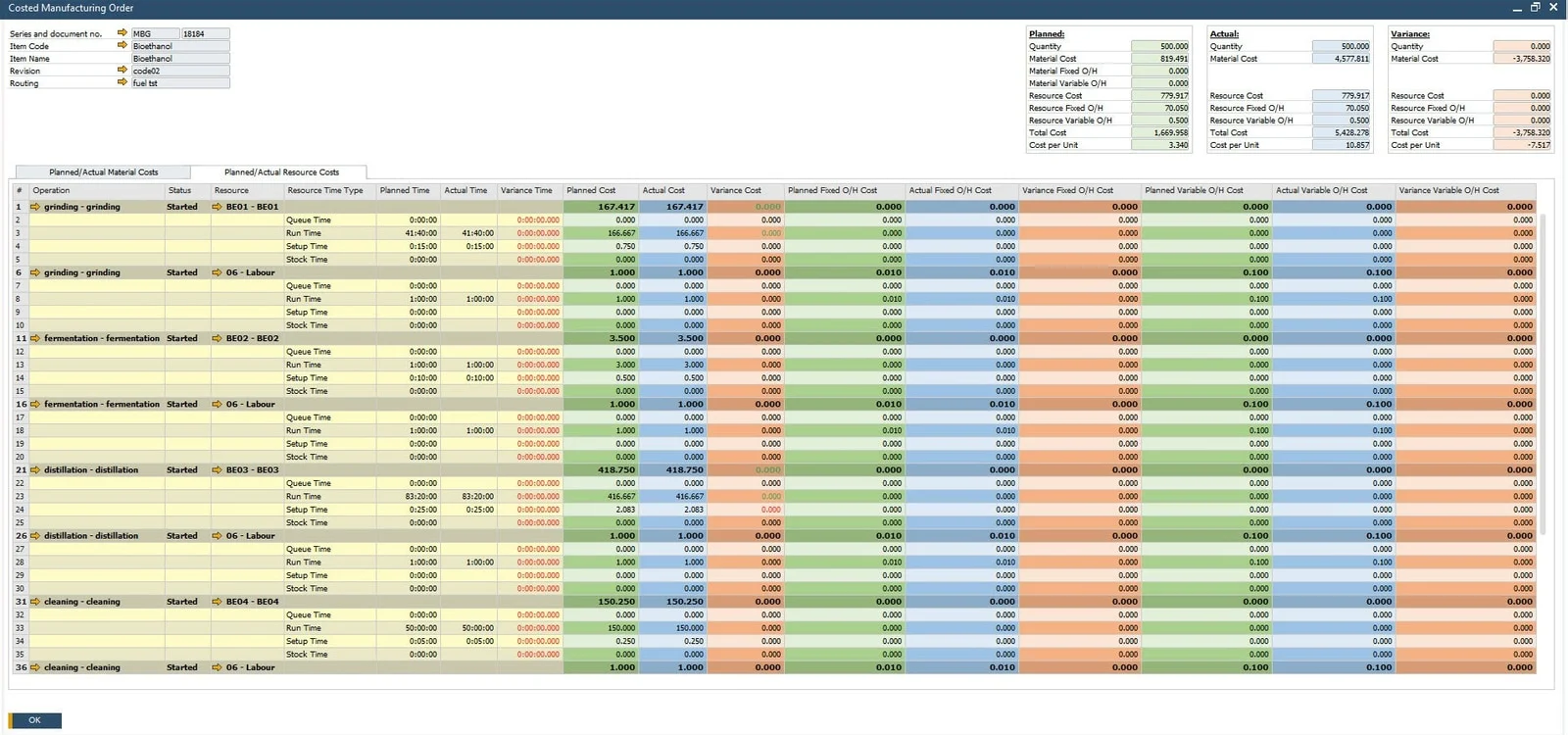
The batch’s costs are allocated proportionally across everything it produced, co-products and scrap included, so each output carries its share. Read alongside the yield analysis, the Costed Manufacturing Order shows whether a variance came from paying more for raw materials, using more of them, or spending longer in the reactor. Each needs a different response.
Using Up Started Batches First
Part-used containers are a quiet source of loss. When a Manufacturing Order draws a material in several issues, picking strictly by expiry date can switch to another batch partway through, leaving an opened drum of resin to expire with a few kilograms still in it.
CompuTec ProcessForce can finish the batch a Manufacturing Order has already started before it picks the next one by expiry date, so you keep first-expired, first-out picking without leaving open drums behind.
Testing a Price Rise Before It Arrives
When a supplier announces a price increase, what you need to know is how it changes the cost of each finished product, through every level of the Bill of Materials.
Cost Categories in CompuTec ProcessForce let you model the new price in a separate set of costs and see its effect on every product that uses the material, without touching the costs your production runs on. You apply the new costs only when you decide to.
For more background, see our earlier posts on SAP Business One and CompuTec ProcessForce cost calculation and How to Manage Yield, and the Product Costing and Bill of Materials & Routings pages. Our Chemicals page covers how CompuTec solutions support chemical manufacturers more broadly, and you can request a demo to see this with your own formulas.