
Quality Control is quite topical at the moment. Horror stories of product defects falling through the cracks and substandard products causing costly and reputation-damaging product recalls reach the public almost daily. In an era of heightened consumer awareness and correspondingly more rigid demands placed on suppliers by retailers, it has never been as crucial to get quality control just right as it is now, and if the current situation is anything to go on, this trend is only set to continue.
Quality Control Management tools are a key feature of the solution that CompuTec ProcessForce for SAP Business One offers to our customers and always have been, but to keep ahead of current trends and make sure our customers can retain full confidence in meeting the demands of an ever more demanding market, our team has been hard at work on some new innovations for the Quality Control functionality. We had three principal aims in mind for what we want to provide our customers with in making these changes:
- Faster, more automated Quality Control procedures
- A more comprehensive Quality Control functionality which still retains a high level of flexibility
- Greater usability
Today I would like to introduce you to the new features that our team came up with and how they can improve Quality Control processes in your business. They are as follows:
- Automated Quality Control Test Creation
- Automatic Batch Status Updates
- Quality Control Test Pools
- Item Test Protocols
- Quality Control Test Creation Wizard
These features are now available in the latest CompuTec ProcessForce version, 9.3 PL07 R1.
1. Automated Quality Control Test Creation
Perhaps the most significant change that I will describe today is that it is now possible to configure CompuTec ProcessForce to create Quality Control Tests automatically. This includes the power to decide exactly when Quality Control Tests are created. This could be when you create a particular SAP Business One or CompuTec ProcessForce document, such as a Goods Receipt PO, or when the status of a Manufacturing Order changes, which will help you better support the production process.
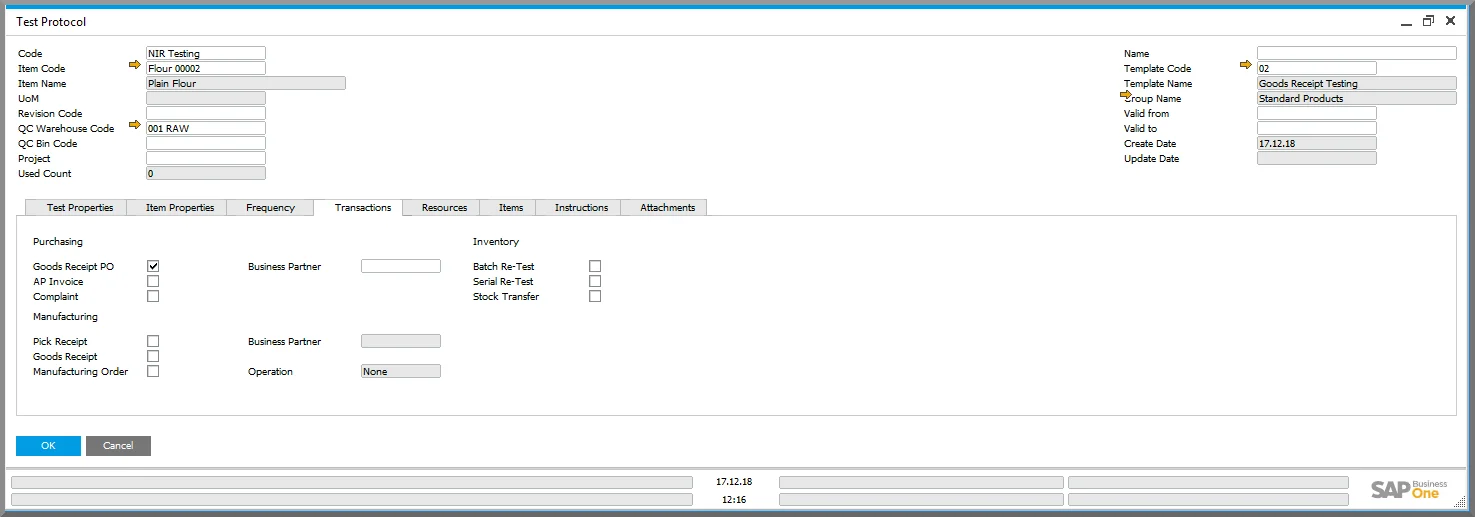
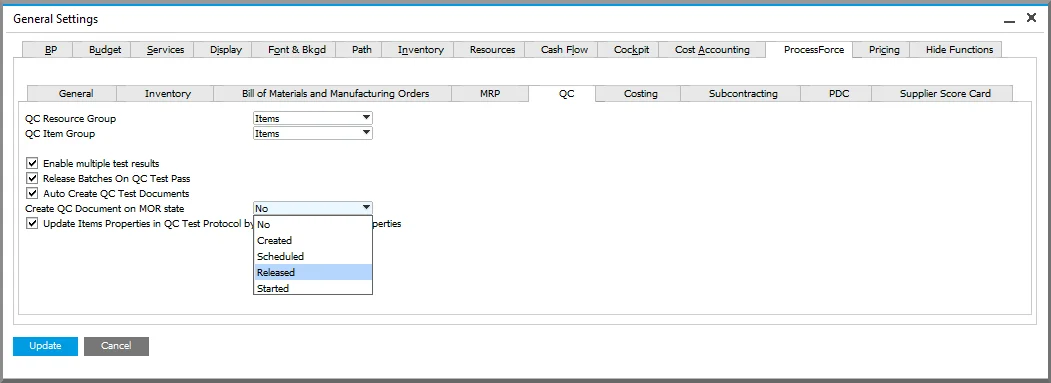
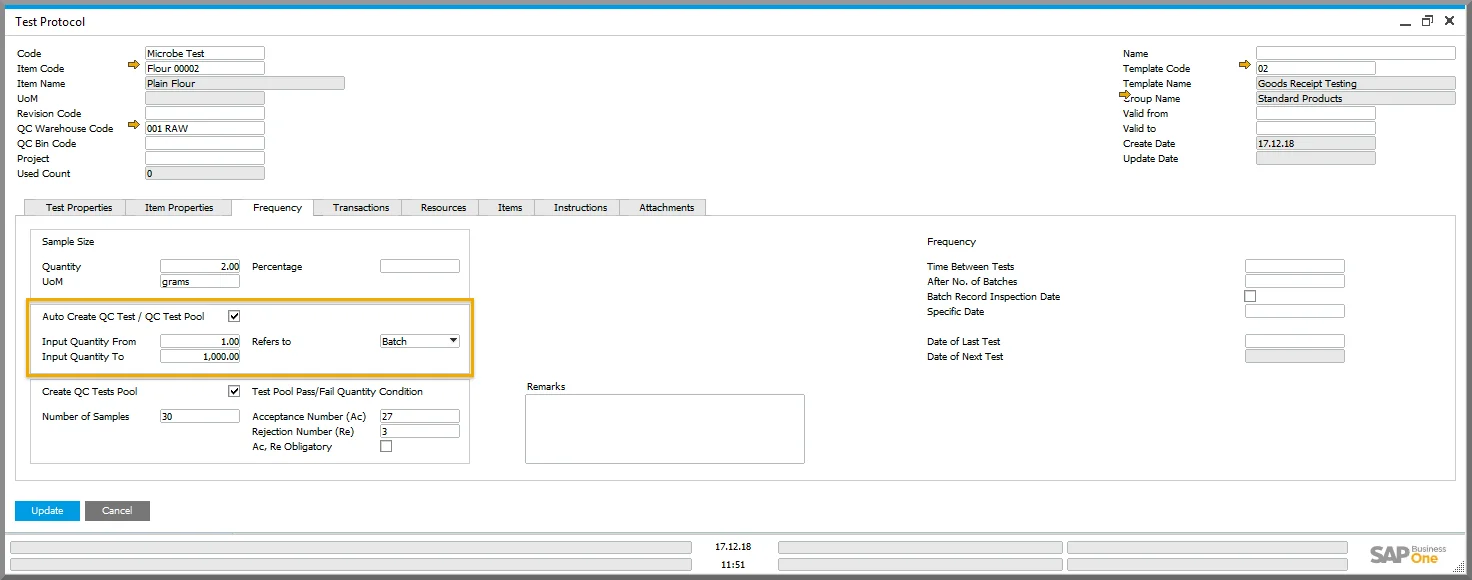
You can also specify what quantities of product should trigger the automatic creation of a Quality Control Test, as demonstrated below. This allows you to define different parameters for different batch sizes. When you receive a small batch, only a small number of samples, or even just a single sample, may be needed. Likewise, when you receive a very large volume of product, you may wish to test more samples, and this function means you can set up your system accordingly once and then everything will happen automatically.
2. Automatic Batch Status Updates
Another feature which introduces more automation to CompuTec ProcessForce is that you can choose for a change in batch status to be triggered when a Quality Control Test is passed.
In SAP Business One and CompuTec ProcessForce there are three kinds of batch status, which are:
- Released: the batch is available and can be used in any relevant transaction.
- Not Accessible: the batch is undergoing a process of some kind, e.g. a production process or indeed a Quality Control process, and is unavailable apart from in inventory movement documents such as Stock Transfer.
- Locked: the batch is unavailable for any one of a multitude of other reasons and, as with the “Not Accessible” status, is only available for inventory movement documents.
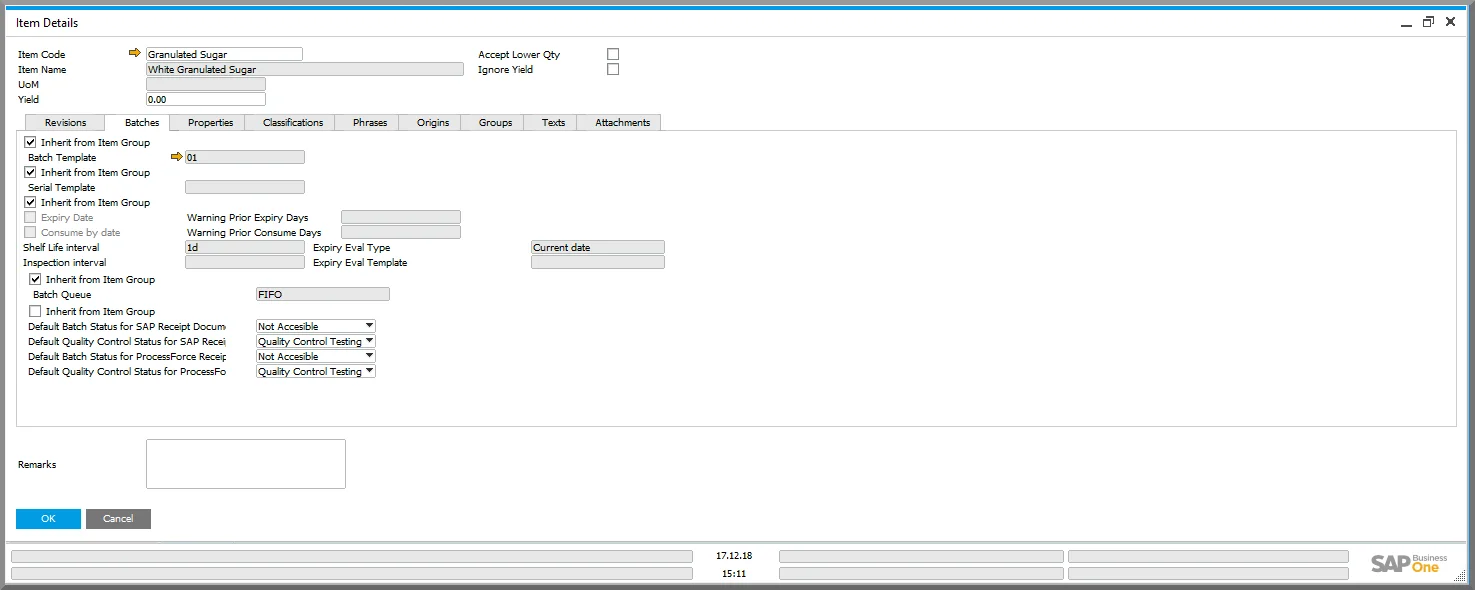
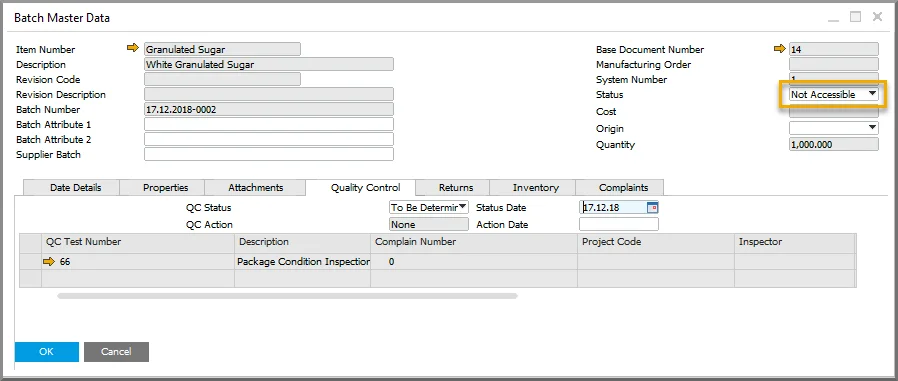
You can set up batches to automatically have any one of these statuses when they are created, and previously you could update this status manually. It’s still possible to change batch status manually, but we have added some automation here too. So let’s say we are receiving some sugar into our warehouse and we want to check the packaging for any damage. We can automatically set the batch status to Not Accessible or Locked so that there is no danger of it being issued for production until it has been checked. But at the same time the Goods Receipt PO is created, a Quality Control Test is automatically generated.
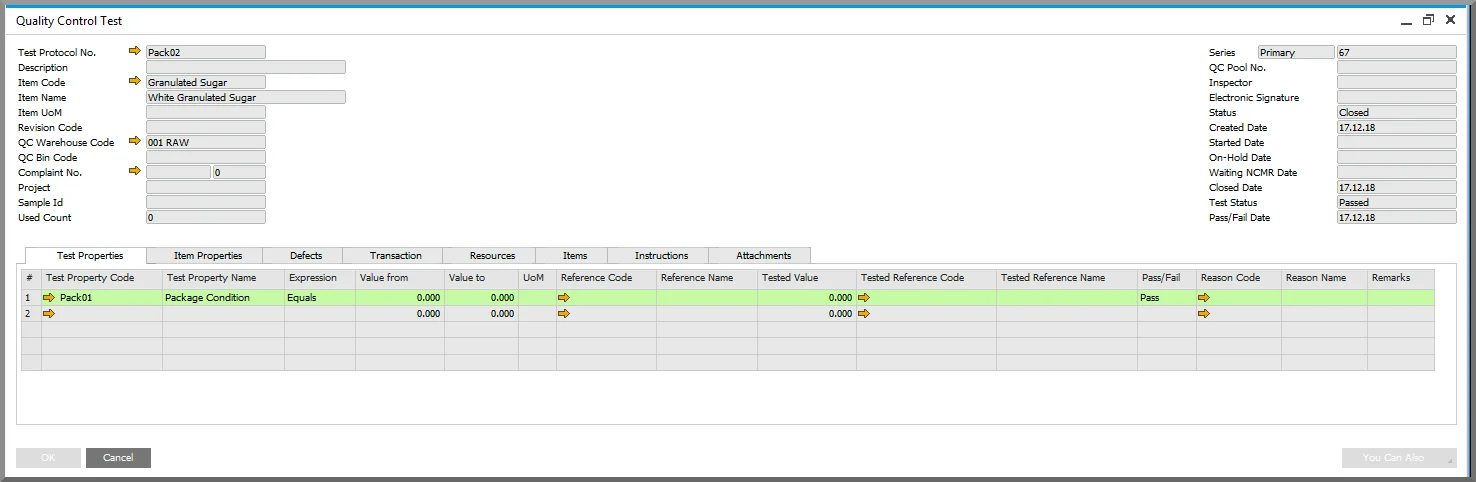
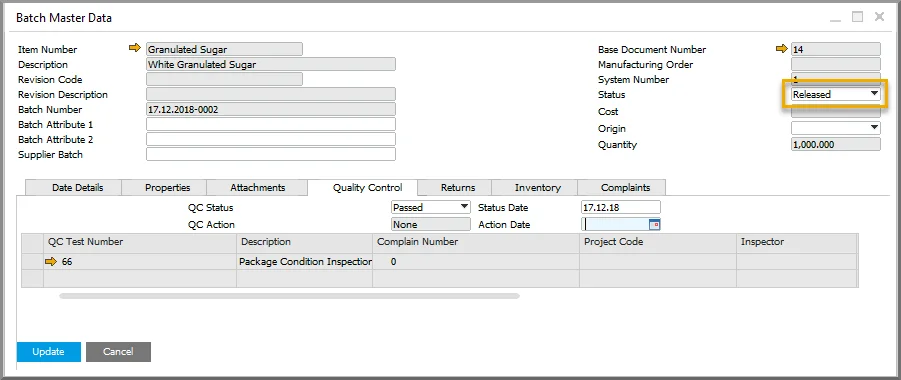
Your Quality Control Inspector comes along and performs the necessary quality control testing on the batch, which the batch passes. The Inspector updates the Quality Control Test with the test results and closes the test, and at this point the batch status will automatically be updated to “Released” and the batch will be able to be used in any transactions required immediately.
3. Quality Control Test Pools
Both of the functionalities that I have just described are further enhanced by another new CompuTec ProcessForce feature: the Quality Control Test Pool. As the name suggests, this document is used to manage a group of Quality Control Tests. This was added because it is often the case that an Item, Batch, or Lot needs to have the same test carried out on it multiple times, and it makes a lot of sense to be able to manage these tests as a whole rather than several isolated entities.
For example, if a bakery receives a batch of flour, it may be necessary to test a large number of samples for microbes. Or if an item has particular storage requirements, such as temperature or humidity, as is the case with many foodstuffs, chemicals, and volatile substances, again a large number of samples may be required at various stages throughout the product’s journey.
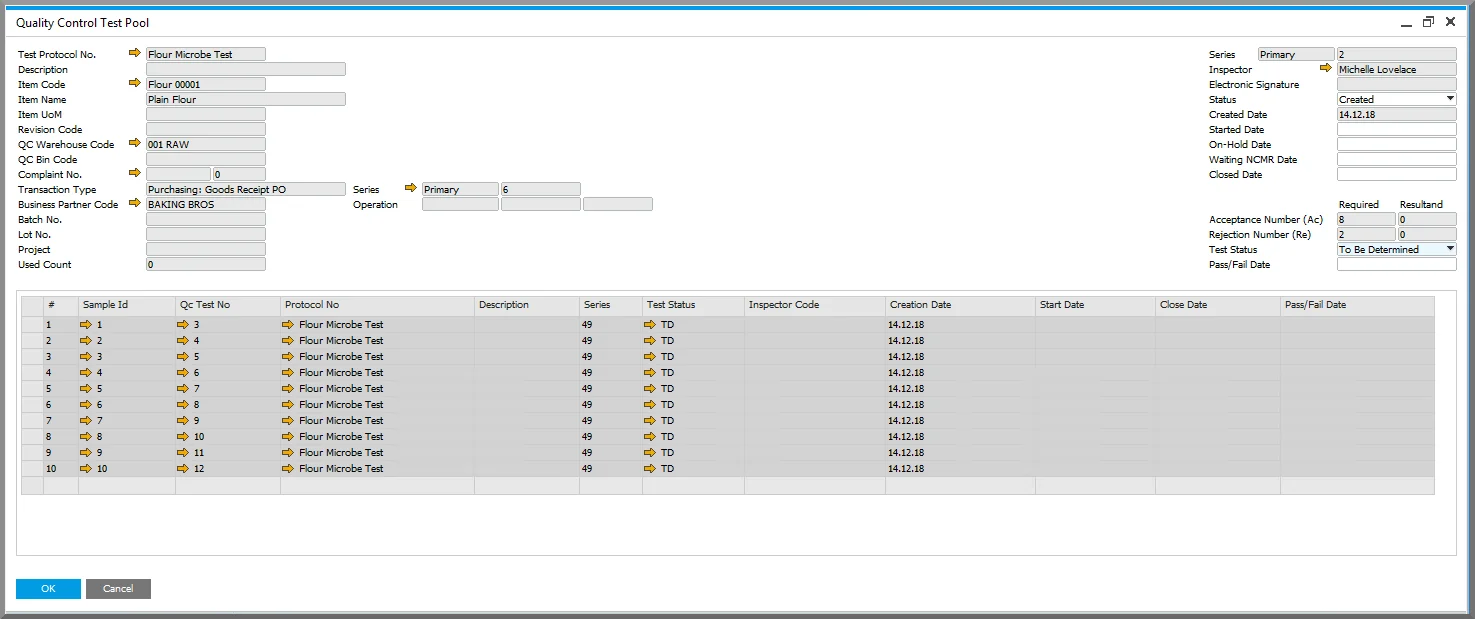
One of the ways in which these pools can be utilized is that you can decide after how many test fails the Item, Batch, or Lot should be discarded. For example, let us take the batch of flour that I mentioned before. The batch has 10 samples taken for microbe testing. Your business standards dictate that if at least 8 out of 10 samples come back within the range you have deemed to be acceptable, the batch can be used for production. If only 7 or fewer samples test within the acceptable range, the batch will be automatically flagged as substandard and for disposal.
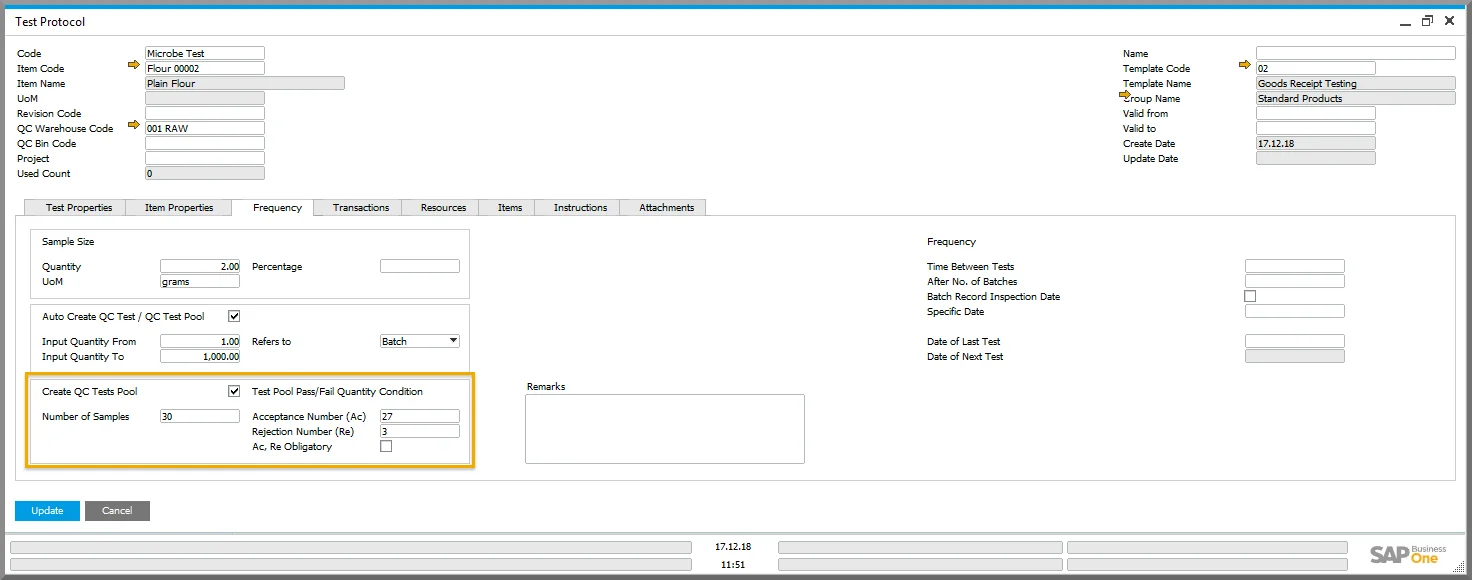
I mentioned before that the first two new functionalities that I described also apply to Quality Control Test Pools. As with single Quality Control Tests, Quality Control Test Pools can also be created automatically if you configure your system to do so. Likewise, rather than batch statuses being updated automatically after a Quality Control Test pass, you can set it up so that the batch status will be automatically updated when the entire Test Pool has been passed and closed.
4. Item Test Protocols
This handy feature brings up a list of all the quality control Test Protocols associated with a particular item. You can also filter the Test Protocols by the document which triggers the creation of the Quality Control Test or by product revision. This overview makes it very easy to check that the correct protocols have been set up for each item, update your protocols while keeping the entire quality control cycle in mind, and see where your quality control procedures could be improved.
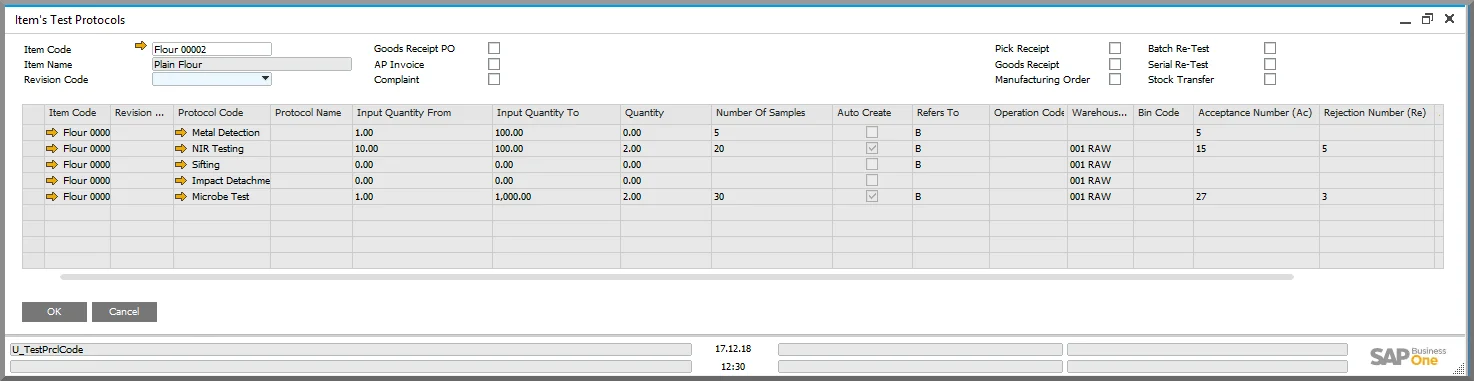
As an example, perhaps you notice that your Quality Control is costing rather more than is ideal. By pulling the whole list, it is easy to spot if there are any tests that are superfluous or could be combined into one protocol. In the case of our flour, there are several different tests carried out with NIR analyzers, such as protein and ash content, which here have been combined into one protocol. Conversely, if you notice an increasing number of complaints or returns of a particular product, by having an overview of all the protocols, it is easier to pinpoint where your quality control procedures should be more robust.
5. Quality Control Test Creation Wizard
This wizard offers the user an extremely quick and straightforward way of ensuring the Quality Control Test Protocols you have defined are followed. When you select the document the Quality Control Test is associated with and the date range you wish to search, CompuTec ProcessForce will display a list of all the instances where a quality control test has not been generated (either manually or automatically). You can then generate the necessary Quality Control Tests by simply selecting the applicable document(s) and running the wizard. This tool makes it incredibly easy to track any neglected quality control procedures and remedy the situation with almost no effort at all.
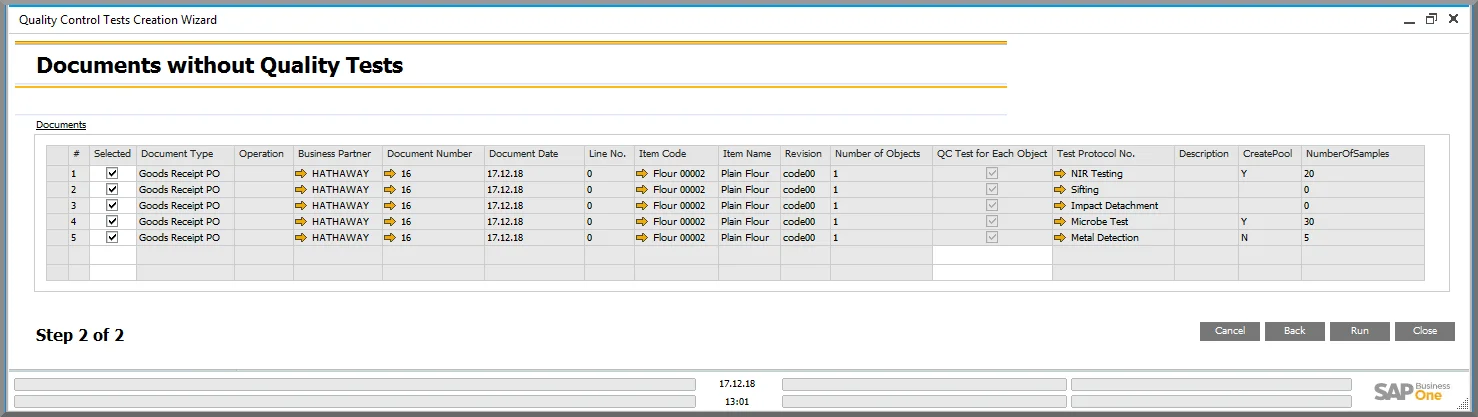
So as you can see, this latest version of CompuTec ProcessForce has brought some fairly significant advances in the Quality Control functionality with it, which we hope will save our customers time, enhance their user experience, and support them in this increasingly demanding market. More information is available on the CompuTec ProcessForce page. If you have any questions or would like to find out more about how CompuTec ProcessForce can benefit your particular manufacturing business, please contact our team to arrange a tailored product demonstration.